
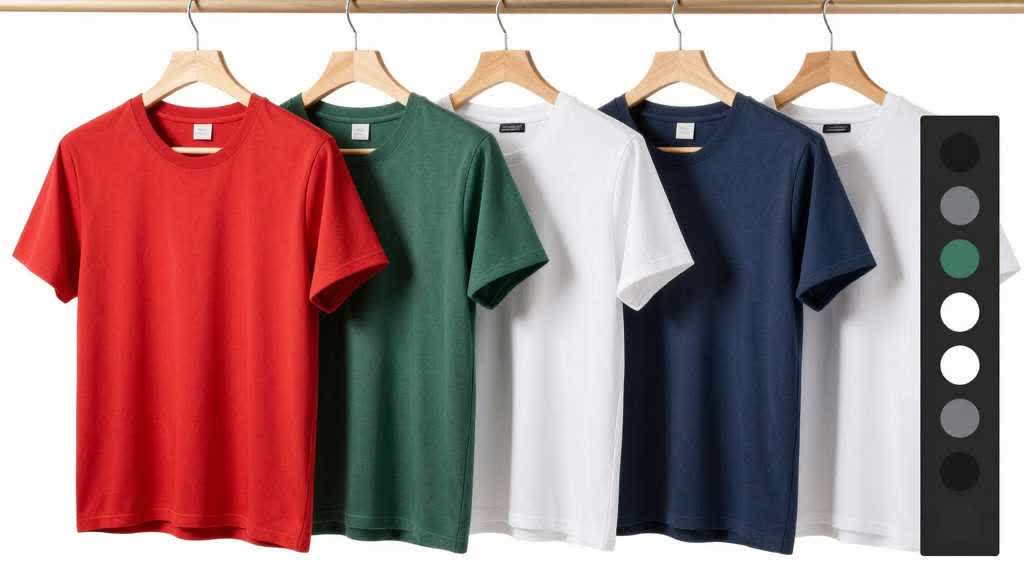
Product Image Color Variant QA for Ecommerce
Product image color variant QA creates a different kind of product-photo problem. A single product photo can look accurate on its own and still fail when it sits beside blue, green, beige, black, white, red, and metallic variants in a selector. Buyers judge the whole set, not one image.
This affects apparel, footwear, bags, beauty packaging, electronics accessories, home appliances, drinkware, furniture, and any product where color drives selection. The image should help the buyer choose the right variant, not make every variant look equally polished.
Quick Answer
For ecommerce color variants, photograph or edit the full variant set with the same lighting, crop, white balance, background, shadow style, and export settings. Product image color variant QA should happen with all variants side by side before upload. Check whether the color still matches the real SKU, whether the variant selector order is clear, and whether mobile thumbnails make variants too similar.
AI color correction and retouching can help remove color cast and improve consistency, but it should not make one variant more saturated, cleaner, glossier, or premium than the real product. In a multi-color catalog, consistency is part of accuracy.
Why Variant Color Fails
Most color problems start before editing. One variant may be shot near a window, another under warm indoor light, and another from a supplier file with heavy compression. A white product may reflect the room. A black product may lose detail. A glossy red product may look more saturated than the real SKU. A beige variant may shift toward gray or yellow depending on the background.
The problem gets worse when teams edit variants one by one. Each image may look acceptable alone, but the full PDP gallery feels uneven. One color appears brighter. One shadow is heavier. One product looks larger because the crop changed. One lifestyle image changes the perceived material.
For ecommerce, the buyer is judging more than polish. The selected color has to match the item that arrives.
Build a Variant Master Set
Start with a master set before creating ads, lifestyle scenes, or A+ modules. The master set should use the same angle, crop, background, shadow, and export size across variants. This gives the PDP a reliable color reference.
For a four-color vacuum, that may mean one clean product-first image for blue, green, teal, and red. For apparel, it may mean one flat lay or model angle for every color. For bags, it may mean one front view, one side view, and one interior view repeated across core colors.
The master set is not the only image style the product can use. It is the anchor. Later scene images, ads, and modules should refer back to it when color starts to drift.
Category-Specific Checks
Different products need different color discipline.
| Category | What buyers inspect | Common failure |
|---|---|---|
| Apparel | shade, fabric texture, transparency, seams | one color looks smoother or more saturated |
| Bags and accessories | leather tone, hardware color, stitching | metal or trim color changes across variants |
| Beauty packaging | label, cap, liquid shade, bottle tint | white bottles turn blue or cream |
| Small appliances | plastic color, glossy reflections, buttons | red or black variants lose surface detail |
| Home goods | wood tone, textile shade, ceramic glaze | room lighting changes material perception |
| Electronics accessories | case color, cable finish, port visibility | black variants hide ports or seams |
The same editing preset should not be applied blindly to every category. A preset that improves a matte fabric image may damage glossy plastic or metal.
Use Swatches Carefully
Swatches help buyers scan variant options, but they can create a mismatch when the swatch and product photo show different shades. A clean color chip may look more accurate than the photographed product, or the photo may look better than the actual material.
If the site uses swatches, match three things: the swatch, the main variant image, and the product that ships. Keep naming consistent as well. "Sky Blue," "Blue," and "Ocean" should not appear as separate labels for the same shade unless the catalog intentionally uses those names.
On Amazon or marketplace pages, variant names and images need extra review because buyers may switch options quickly. A wrong thumbnail can make the wrong variation feel selected.
AI Retouching Risk for Variants
AI tools can make variant sets look cleaner. They can remove color cast, balance exposure, clean backgrounds, reduce noise, and make catalog images more consistent. The risk is that the tool may beautify one variant more than another.
This is common with bright colors, black products, metallic products, and transparent materials. A red appliance may become more vivid. A black product may lose edge detail. A metallic finish may become flatter. A clear plastic item may become opaque. These changes look minor inside an editor and obvious when the product arrives.
Use AI editing as a controlled step. Keep the original file, save the corrected master, and compare every output against the real SKU or a trusted reference image.
Mobile and Product Grid Review
Variant QA should happen at the size buyers actually see. A color difference that looks clear on desktop can disappear in a mobile selector. A dark navy variant can look black. A beige item can look white. A teal variant can look blue or green depending on the display.
Review the final images in four places:
- product grid thumbnail
- PDP main image
- mobile variant selector
- zoom or gallery view
If two variants become hard to distinguish at thumbnail size, use a clearer crop, a better swatch, or a supporting close-up. The variant name should support the image, not carry the whole decision.
Workflow Before Publishing
Use this product image color variant QA sequence for multi-color products:
- Collect the best source image for every color.
- Choose one master angle and crop rule.
- Correct white balance before adding saturation or contrast.
- Compare each color against the real SKU or approved reference.
- Align shadow, background, and product scale across variants.
- Review swatches and variant labels beside the images.
- Test mobile thumbnails and product-grid display.
- Create lifestyle or A+ images only after the master set is stable.
For the broader source correction workflow, read Color Correction for Ecommerce Product Images. That article covers general product-photo color accuracy. This page focuses on the stricter QA needed when several variants appear together.
Review Variant Sets in LoomaDesign
LoomaDesign fits the stage where sellers need to clean, enhance, and extend product images without losing product truth. A team can improve weak source files with the AI Product Image Enhancer, then prepare angle, detail, and variant assets with AI Product Image Generator for PDPs, marketplaces, and content modules.
For multi-color products, keep one approved master view for each SKU, then use LoomaDesign to build supporting images around that approved reference. The workflow keeps color review tied to the actual catalog item before the team creates lifestyle, A+ content, or ad assets.
For adjacent workflows, use AI Product Photo Retouching Tools for Ecommerce when cleanup is the main issue, AI Product Image Generator for Ecommerce when creating new visual sets, and Product Image Generator vs Product Photo Editor when deciding whether the task is editing or generation.
FAQ
How do I keep product color variants consistent? Use the same lighting, crop, background, white balance, shadow style, and export settings across the variant set. Review the full group side by side before publishing.
Can AI fix color differences across variants? AI can help reduce color cast and align exposure, but the result must be compared against the real SKU. The tool should not make one variant more saturated, glossy, or premium than it really is.
Should product swatches match the photo or the real item? Swatches should match the real item first, then align with the product photo. If the photo and swatch disagree, buyers may select the wrong variant.
Which products need strict color variant QA? Apparel, beauty, bags, home goods, appliances, furniture, accessories, and color-driven electronics all need strict review because color is part of the purchase decision.
Sources and Data Points
- Shopify Help Center, Product media types
- Shopify Help Center, Uploading images
- Google Merchant Center Help, Image link attribute
- Seller and ecommerce community discussions around color variants, supplier photo mismatch, mobile thumbnails, and return risk were reviewed for phrasing and buyer objections.