
Amazon A+ Content AI Examples: 8 SKU-Level Modules
Amazon A+ Content AI examples work when they stay close to a SKU. A generic example such as "feature grid for a premium product" does not tell the seller what fact to provide, what image to generate, which claim to block, or how to reject a weak output.
The examples below show the full working unit: product facts, buyer doubt, module job, visual direction, draft copy, and review rule. Use them after choosing a structure from the Amazon A+ Content AI templates, then use the Amazon A+ Content AI prompts page to generate copy inside the selected module.
Quick Answer
Strong Amazon A+ Content AI examples do four things at once:
- start from verified product facts
- answer one buyer doubt
- specify the visual proof the image must show
- define the review rule before export
In LoomaDesign, an example should become an operating pattern. Upload or choose the product photo, add the SKU facts, select the A+ module job, generate the module visual, then check whether the output preserves the product and supports the claim. The Amazon A+ Content AI hub is the right starting point for that workflow.
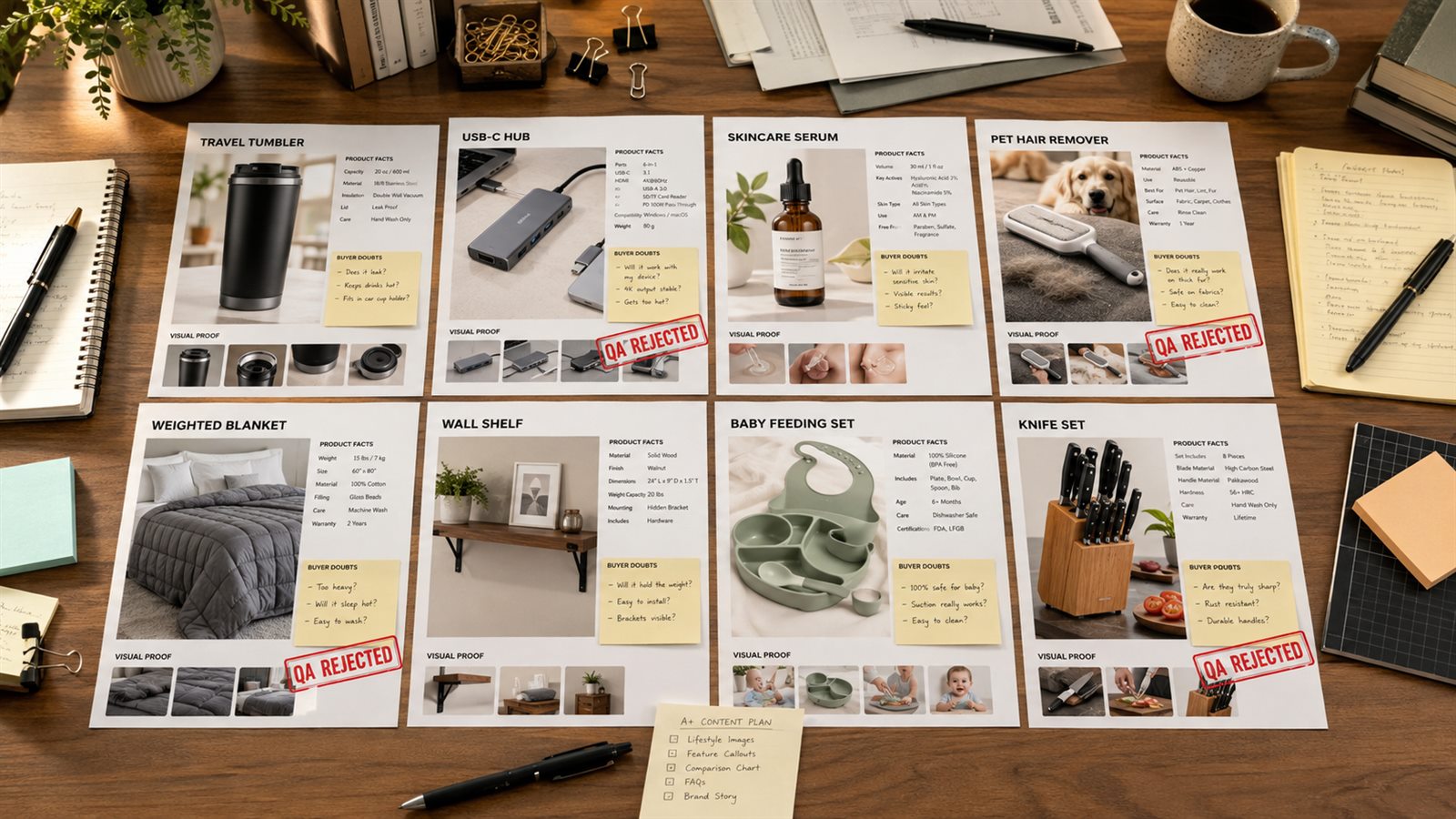
How to Read These Examples
Each example uses the same frame:
| Field | What it controls |
|---|---|
| Product facts | the details AI may use |
| Buyer doubt | the question this module must answer |
| Module job | the A+ section type and purpose |
| Visual direction | the image the module needs |
| Draft copy | short copy that can fit a module |
| Reject rule | the reason to discard the output |
This keeps the examples separate from the template page. Templates choose the module type. Examples show what a finished brief looks like for a specific product situation.
Which Example Should You Copy?
Choose the example by seller task, not by product category. A knife set and a skincare serum can both need trust proof, but the knife set needs closeups of materials and storage while the serum needs claim control and routine context.
The table below gives each module a clean job before the SKU details change.
| Seller task | Copy this example | Why it fits |
|---|---|---|
| Prove one physical feature | Travel tumbler feature proof | The module ties one buyer doubt to closeups the shopper can inspect. |
| Explain ports, variants, or device fit | USB-C hub compatibility chart | The module keeps compatibility inside verified product records. |
| Keep claims safe in a sensitive category | Vitamin C serum claim proof | The module shows routine, packaging, and texture without implying treatment results. |
| Replace vague lifestyle shots | Pet hair remover problem-solution | The module shows the surface, the tool, and the cleanup step. |
| Help buyers choose a variant | Weighted blanket size chooser | The module compares SKU options without making health claims. |
| Show included parts or setup | Wall shelf setup sequence | The module turns package contents into a three-step visual. |
| Clarify bundle contents | Baby feeding set bundle module | The module prevents AI from adding accessories the seller does not ship. |
| Support premium positioning | Knife set trust module | The module uses material, handle, blade, and storage proof instead of broad quality language. |
Example 1: Leakproof Travel Tumbler Feature Proof
Product facts: 20 oz stainless steel tumbler, silicone gasket lid, sliding sip cover, cup-holder base, powder-coated finish.
Buyer doubt: Will this leak in a bag or car?
Module job: feature proof grid.
Visual direction: four tiles showing lid gasket closeup, sliding cover, cup-holder base, and grip texture. Product color and lid shape must match the SKU.
Draft copy:
- Silicone gasket lid: helps seal the drinking opening during daily carry.
- Sliding sip cover: opens with one hand while keeping the top covered between sips.
- Cup-holder base: sized for commute and desk use.
- Powder-coated grip: matte finish for easier handling.
Reject rule: reject any image that shows the tumbler upside down with liquid pouring, claims "100% leakproof" without test evidence, changes the lid geometry, or invents a handle.
Example 2: USB-C Hub Compatibility Chart
Product facts: 7-in-1 USB-C hub, HDMI, two USB-A ports, SD card slot, microSD slot, 100W pass-through charging, aluminum shell.
Buyer doubt: Will it work with my laptop and the ports I need?
Module job: comparison and compatibility chart.
Visual direction: clean device layout with each port labeled, plus a short compatibility row for laptop type, display use, card transfer, and charging.
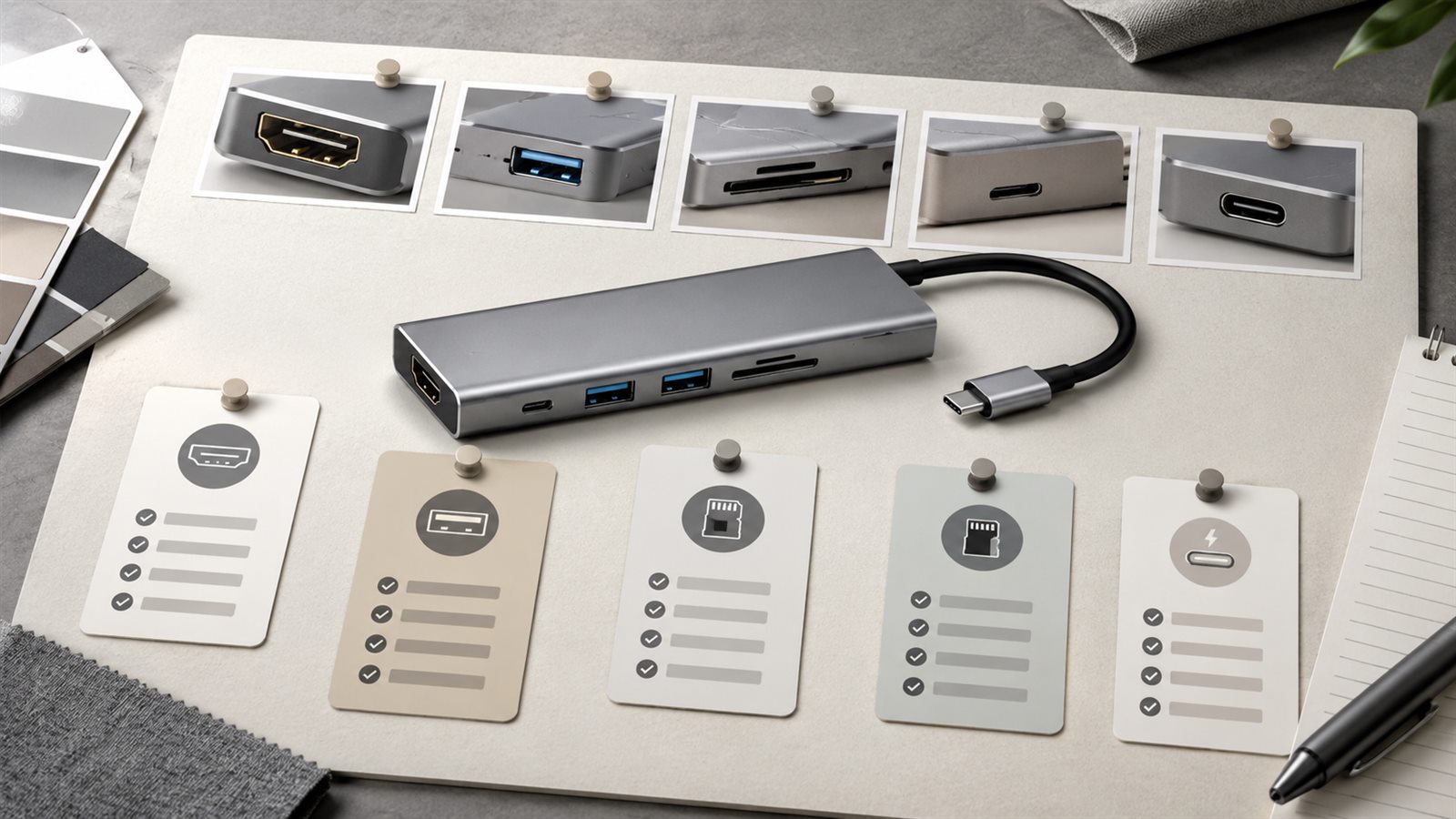
Draft copy:
| Use case | Supported by |
|---|---|
| External monitor | HDMI port |
| File transfer | USB-A, SD, and microSD slots |
| Charging while connected | USB-C pass-through |
| Desk setup | compact aluminum body |
Reject rule: reject if the copy lists unsupported resolution, device brands, charging speed, or operating systems that are not in the product record.
Example 3: Vitamin C Serum Claim-Safe Proof Module
Product facts: 30 ml vitamin C serum, amber bottle, dropper cap, fragrance-free formula, morning or evening routine use.
Buyer doubt: Is the routine clear, and are the claims safe?
Module job: claim proof and routine module.
Visual direction: bottle, dropper texture, simple routine order, and packaging size. Do not show skin transformation or medical-style results.
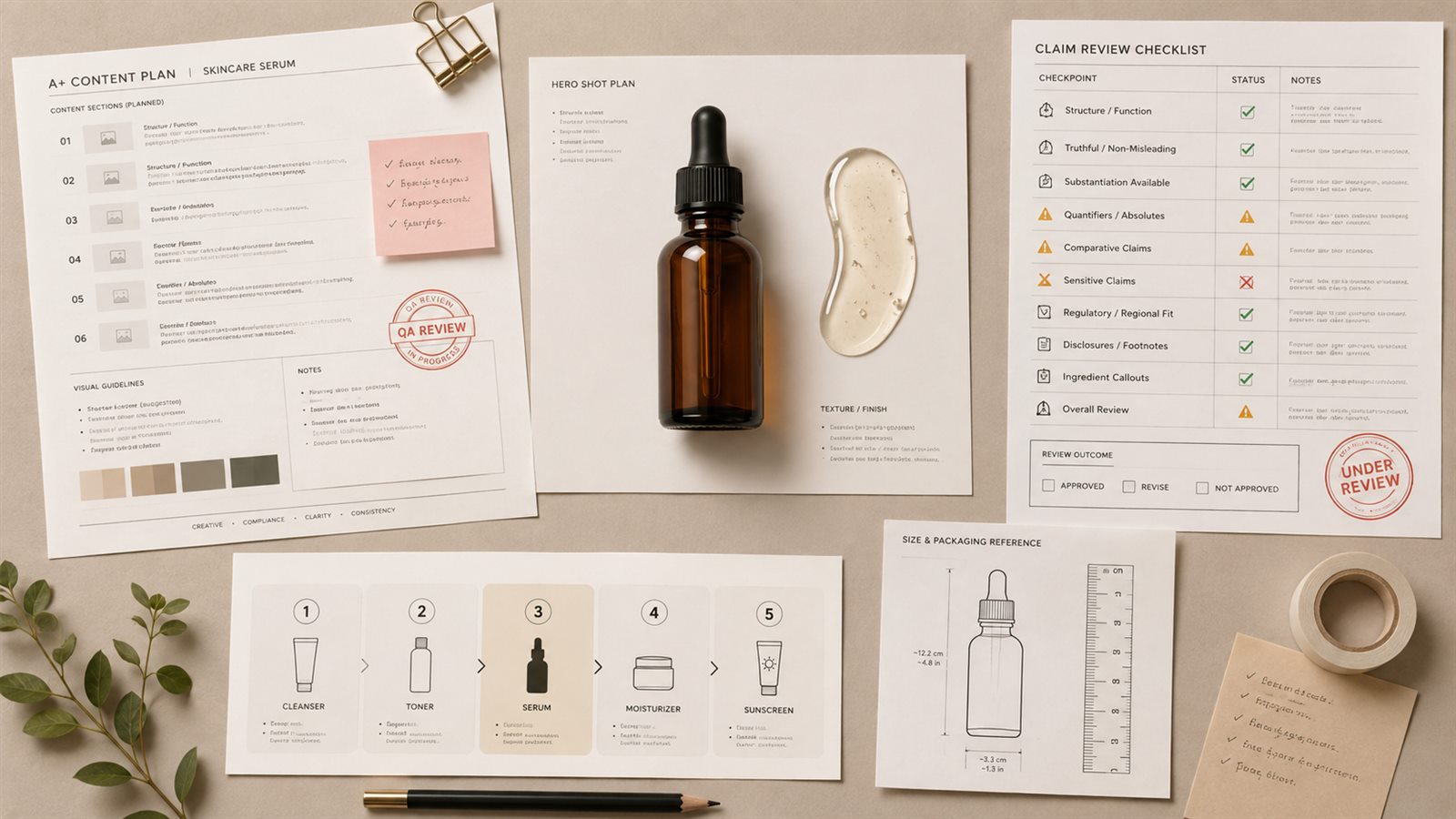
Draft copy:
- Fragrance-free daily formula
- 30 ml bottle for routine use
- Dropper format for controlled application
- Use with your regular moisturizer and sunscreen routine
Reject rule: reject before/after skin images, disease claims, "dermatologist approved" language without proof, or any claim that promises treatment, repair, or guaranteed results.
Example 4: Pet Hair Remover Problem-Solution Module
Product facts: reusable pet hair remover, manual roller, self-cleaning base, no adhesive sheets, compact storage.
Buyer doubt: Is this easier than lint rollers?
Module job: problem-solution module.
Visual direction: split module showing sofa fabric with visible pet hair, the roller in use, and the self-cleaning base. Keep pet hair scale believable.
Draft copy:
Daily pet hair cleanup without disposable sheets. Roll over sofas, blankets, and cushions, then return the tool to the base to collect debris for emptying.
Reject rule: reject if the image implies carpet vacuuming, liquid cleanup, deep cleaning, or fabric repair. The product is a manual hair remover, not a vacuum.
Example 5: Weighted Blanket Size Chooser
Product facts: weighted blanket available in 12 lb, 15 lb, and 20 lb versions; cotton cover; square quilting; machine-washable removable cover.
Buyer doubt: Which weight should I choose?
Module job: variant comparison chart.
Visual direction: three folded blankets with clear weight labels and a simple chooser row. Keep colors and quilting accurate.
Draft copy:
| Version | Best for |
|---|---|
| 12 lb | lighter everyday coverage |
| 15 lb | balanced feel for many adults |
| 20 lb | heavier blanket preference |
Reject rule: reject medical or sleep-treatment claims. Keep the module about product choice, material, cover care, and weight preference.
Example 6: Wall Shelf Setup Sequence
Product facts: two floating shelves, metal brackets, screws and anchors included, each shelf 24 inches wide, wood veneer finish.
Buyer doubt: Is installation clear, and what is included?
Module job: setup sequence.
Visual direction: three-step horizontal sequence: measure wall, mount brackets, place shelf. Include a separate included-parts flat lay.
Draft copy:
- Measure and mark bracket position.
- Secure brackets with included hardware.
- Place shelves and check alignment.
Reject rule: reject if the image hides anchors, shows a different bracket style, claims no-tools installation, or places heavy objects beyond the product's documented limit.
Example 7: Baby Feeding Set Bundle Module
Product facts: silicone bib, divided plate, training spoon, suction bowl, cup, dishwasher-safe silicone, gift box.
Buyer doubt: What is included, and is the set useful as a starter kit?
Module job: bundle contents module.
Visual direction: flat lay of every included item with labels. Use one small routine scene only if every shown item is part of the set.
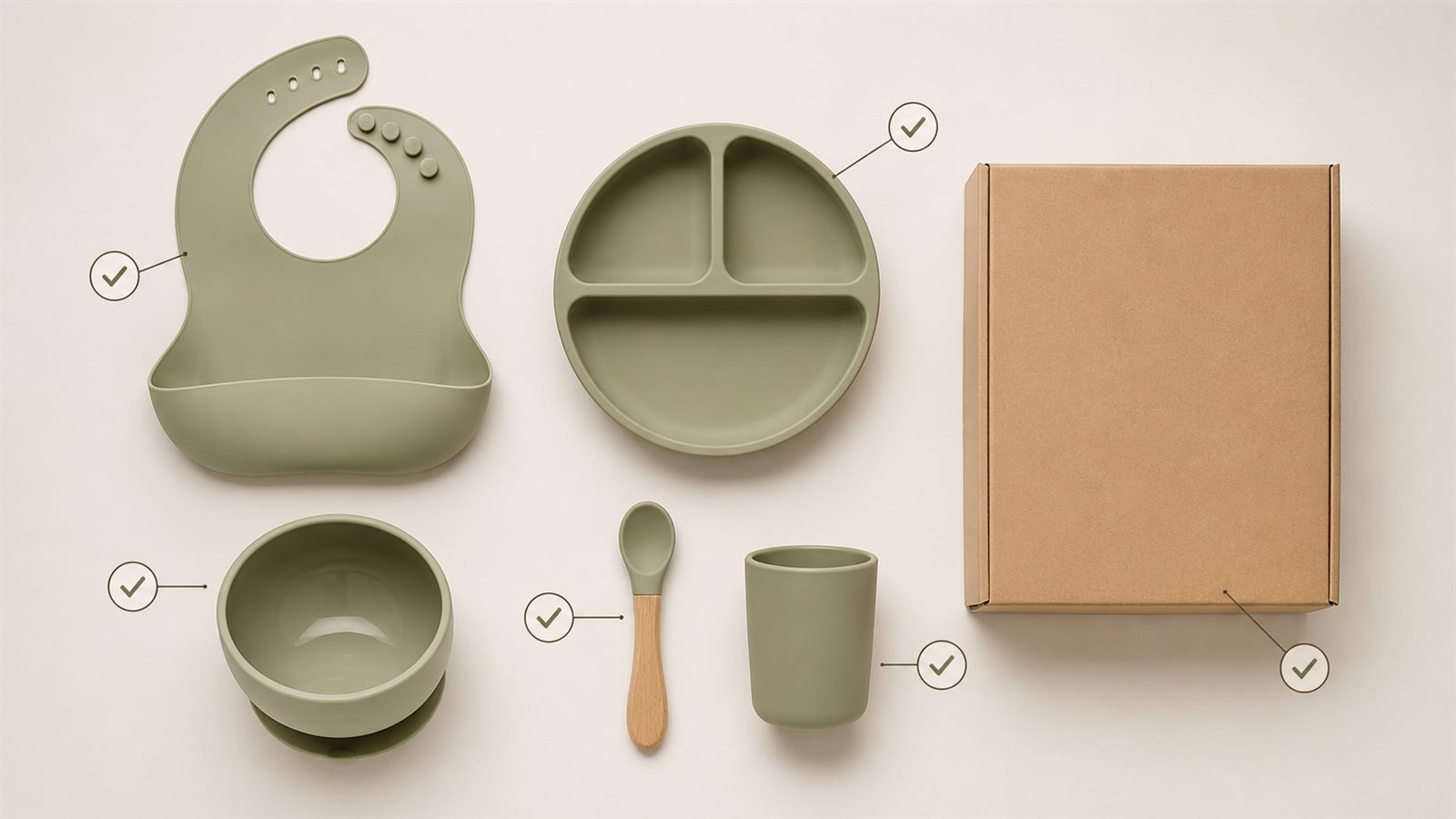
Draft copy:
Starter feeding set with bib, divided plate, suction bowl, training spoon, and cup. Each piece is made from dishwasher-safe silicone for everyday meals and cleanup.
Reject rule: reject if the generated image adds toys, extra spoons, food containers, bottle parts, or packaging claims that are not in the SKU.
Example 8: Premium Knife Set Trust Module
Product facts: five stainless steel knives, wooden block, ergonomic handles, labeled blade types, care note says hand wash recommended.
Buyer doubt: Why does this set justify a premium price?
Module job: trust and proof module.
Visual direction: closeups of blade profile, handle shape, block storage, and full set. Avoid exaggerated cutting scenes or unsupported professional-chef claims.
Draft copy:
- Five essential blade types
- Balanced handles for everyday prep
- Wooden block for counter storage
- Hand wash recommended for finish care
Reject rule: reject if the image changes blade count, adds sharpening tools, claims dishwasher-safe care, or uses safety claims not supported by the product record.
Turn One Example Into a LoomaDesign Brief
Use this brief before generation:
| Brief field | Seller input |
|---|---|
| Product | SKU, variant, material, dimensions, included parts |
| Buyer doubt | one hesitation from reviews, Q&A, ads, or support |
| Module | feature proof, comparison, setup, bundle, routine, trust |
| Visual proof | closeup, diagram, lifestyle scene, flat lay, sequence, chart |
| Copy limit | headline, tile, row, or caption length |
| Review rule | what must make the output fail |
Then move the brief into LoomaDesign:
- Upload or choose the product photo.
- Paste the SKU facts and module brief.
- Generate the A+ visual around the selected module job.
- Check the generated output against the reject rule.
- Use the prompt library after the module proof is clear.
A+ Content works as visual merchandising. A polished line of text does not help if the image changes the SKU or the module repeats another part of the page.
Common Mistakes in A+ Example Libraries
Fact-free module examples teach structure but not execution. Sellers need to see what the AI may use and what it must not invent.
Finished-copy examples hide the hard part. The copy above stays short by design; the useful part is the proof chain that connects fact, buyer doubt, image, copy, and review rule.
Lifestyle scenes fail when shoppers cannot inspect the product. A hidden SKU belongs in an ad test, not the core A+ section.
Mobile readability needs a separate pass. Shoppers read A+ modules on phones, so text that needs a desktop preview should be shorter or moved to another module. Use the Amazon A+ Content dimensions checklist before export.
FAQ
What are good Amazon A+ Content AI examples for beginners?
Start with one feature proof grid, one comparison chart, and one setup or bundle module. These make the product facts and review rules easy to see.
How are examples different from templates?
Templates define the reusable module structure. Examples show how that structure works for one SKU with facts, visual proof, copy, and a reject rule.
Can I use these examples for Premium A+?
Yes, but Premium A+ needs sequencing. Use these examples as individual modules, then arrange them into a story where each module answers a different buyer doubt.
Should examples include compliance checks?
Yes. A useful example should include a reject rule. That rule protects SKU accuracy, claim support, bundle contents, mobile readability, and platform review risk.
Can LoomaDesign create the visuals from these examples?
Yes. Use Amazon A+ Content AI to turn the product photo, facts, and module brief into visual drafts, then review the result before using it in A+ Content Manager.
Related LoomaDesign Resources
- Amazon A+ Content AI
- Amazon A+ Content AI Templates
- Amazon A+ Content AI Prompts by Module Type
- Amazon A+ Content Dimensions Checklist
When This Is the Wrong Workflow
This workflow is a poor fit when the seller has no verified product facts, no product image reference, or no manual review step. AI can help produce A+ module drafts faster, but it should not guess product details, add bundle items, invent compatibility, or make claims the seller cannot support.
Use Amazon's current A+ guidance and Seller Central module requirements as the final production reference before upload.