
AI Product Image Generator for Detail Images: Show Texture, Parts, and Proof Without Changing the SKU
An AI product image generator for detail images is useful when buyers need to inspect the part of the product that decides trust. A main image shows the product. A detail image shows the seam, clasp, button, port, label, texture, material, coating, control panel, zipper, edge, or finish that supports the claim.
That detail has to stay faithful to the real SKU.
Many product pages treat closeups as decoration. The gallery shows a glossy crop, a soft background, and a label such as "premium quality." Buyers still cannot see the part they care about. A backpack buyer wants the zipper and laptop sleeve. A skincare buyer wants texture and bottle size. A small appliance buyer wants controls, removable parts, and cleaning surfaces. A jewelry buyer wants the clasp, chain, stone setting, and scale.
Quick Answer
Use an AI product image generator for detail images after you know which product detail answers a buyer doubt. Start with a high-quality source photo, define the part that must stay accurate, generate one closeup for one proof point, then review the image at full size and mobile thumbnail size.
The safest detail image workflow protects product shape, material, color, label, hardware, finish, and scale. Use enhancement when the real detail exists but looks soft. Use generation when you need a cleaner crop, better lighting, or a product-page version of an already visible detail. Use a reshoot when the source photo lacks the detail buyers need to inspect.
Why Detail Images Matter
Detail images sit between the clean product shot and the lifestyle image. They give buyers evidence.
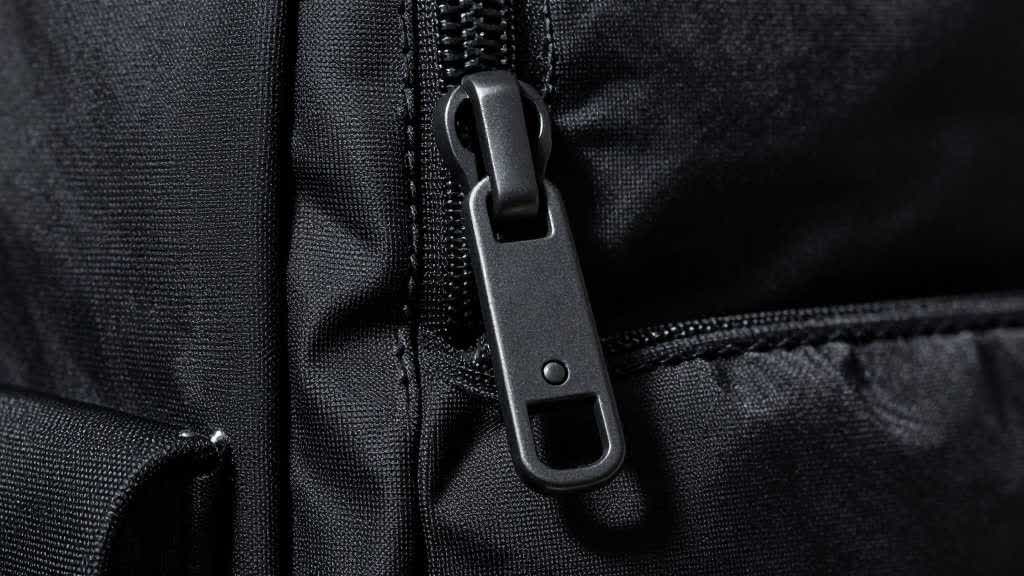
A product page can say "durable zipper," but the closeup should show the zipper teeth, puller, stitching, and surrounding fabric. A skincare page can say "lightweight texture," but the image should show the cream, serum, gel, or foam in a way that matches the real formula. A water bottle can claim leak resistance, but the detail image should show cap construction, seal shape, and closure style.
A detail image should answer one practical question:
- What material is it?
- What part makes it work?
- How is it opened, closed, cleaned, worn, connected, or adjusted?
- Does the quality match the price?
- Can the buyer trust the product after zooming in?
If the image misses those questions, it may belong in a mood board, not the product gallery.
Choose the Right Detail for the Category
The best closeup depends on the product category. Skip general prompts such as "premium closeups." Name the detail and the buyer doubt.
| Category | Detail image buyers often need | Risk to check |
|---|---|---|
| Bags and backpacks | zipper, handle, strap, laptop sleeve, pocket layout, fabric | changed stitching, fake pockets, softer texture |
| Beauty and skincare | label, cap, dropper, tube opening, cream texture, liquid color | invented claims, wrong formula color, fake label text |
| Jewelry and accessories | clasp, chain, stone setting, finish, model scale, packaging | wrong metal tone, oversized macro crop, changed clasp |
| Small appliances | controls, basket, blade, lid, vent, cord, removable part | invented parts, unsafe use scene, fake display |
| Electronics accessories | port, connector, button, cable, charging case, compatibility detail | wrong port type, extra cable, changed button layout |
| Home goods | material texture, seam, edge, opening, assembly part, surface finish | wrong scale, smoothed texture, fake material |
This category map keeps the image useful. It also prevents the AI from turning every detail shot into the same soft macro photo.
Start With a Product Truth Sheet
Before generating closeups, write a short product truth sheet. It should fit in one screen.
For a backpack:
- product color: charcoal gray
- material: woven polyester with black mesh side pockets
- details to show: zipper pull, shoulder strap, laptop sleeve, side pocket mesh, handle stitching
- details that cannot change: pocket count, zipper shape, strap width, fabric texture, logo position
- banned additions: fake USB port, extra buckle, leather patch, rain cover, laptop model, travel props
For a skincare serum:
- product color: amber bottle with black dropper cap
- liquid color: pale gold
- details to show: dropper tip, label, serum droplet, cap texture, bottle base
- details that cannot change: label order, bottle shape, cap material, liquid color, volume mark
- banned additions: certification badges, ingredient claims, skin result photos, extra products
The sheet gives the prompt a boundary. It also gives the reviewer a checklist after the image comes back.
Prompt One Detail at a Time
Detail images fail when the prompt asks for too much. A single closeup should prove one thing.
For a zipper:
> Create a close-up ecommerce product image from the reference photo. Focus on the zipper pull, zipper teeth, surrounding fabric, and stitching. Keep the exact product color, material texture, zipper shape, pocket position, and stitching pattern from the reference. Use clean studio lighting and a tight crop for a product detail image. Exclude extra pockets, labels, badges, props, hands, and different hardware.
For a skincare texture:
> Create a product detail image from the reference bottle and formula. Show the real serum texture beside the bottle in a clean macro composition. Keep the bottle shape, label placement, cap color, liquid color, and package size unchanged. Exclude ingredient badges, medical claims, skin result photos, extra bottles, and changed label text.
For an electronics port:
> Create a close-up product detail image showing the charging port and button layout from the reference. Keep the exact port type, button position, material finish, product edge, and color. Use sharp lighting so the port is easy to inspect. Exclude invented cables, adapters, indicator lights, icons, and extra controls.
These prompts sound plain because the task is plain. The detail image should make a product fact easier to inspect.
Use Enhancement Before Generation When Detail Is Soft
If the source photo already contains the right detail, an image enhancer may be the better first step. Enhancement can help with edge clarity, compression artifacts, soft texture, and weak crop quality.
The key is to check whether the enhancer is recovering real information or inventing a cleaner-looking surface.
Use enhancement when:
- the edge exists but looks compressed
- the label is visible but soft
- the texture is present but lacks crispness
- the product shape is accurate
- the closeup needs a sharper export for zoom
Use a new generated detail image when:
- the source product is accurate
- the detail exists in the reference
- you need a cleaner crop or product-page composition
- the final output will still be reviewed against the real SKU
Use a reshoot when:
- the source lacks the detail
- the product is out of focus
- label text is missing
- the material has no visible texture
- the part must be exact for fit, safety, compatibility, or compliance
AI guessing creates risk for clasps, ports, labels, seams, caps, and connectors. If the buyer will use that detail to decide, the detail needs a reliable source.
Build Detail Images Into the Gallery Sequence
A detail image works best when it has a clear slot in the product page.
For an Amazon listing or ecommerce PDP, a practical sequence might be:
- main image
- angle image
- scale or use image
- detail proof image
- included parts or packaging image
- comparison or variant image
- mobile-readable summary image
The detail image has a separate role from the main image. It should zoom into the proof that the main image cannot explain.
For A+ Content, detail images can support modules such as:
- material proof
- care and cleaning
- feature explanation
- craftsmanship
- compatibility
- use step
- package contents
- comparison against older model or lower tier
Amazon describes A+ Content as enhanced product detail content with images, text placements, and comparison modules. Detail images give those modules better evidence because the shopper sees the actual part behind the claim.
QA Checklist Before Publishing
Review every AI-generated detail image against the original SKU.
| Check | What to inspect |
|---|---|
| Product shape | The crop has not changed the product outline or proportions |
| Color | The detail matches the real variant under normal ecommerce lighting |
| Material | Texture, grain, fabric, metal, glass, plastic, or coating still looks accurate |
| Hardware | Zippers, clasps, ports, buttons, caps, handles, and screws match the real product |
| Label | Text placement, logo, and packaging marks stay fixed |
| Scale | Macro crop keeps the product or part honest |
| Claims | The image avoids waterproofing, medical benefit, durability, compatibility, or included-parts claims without proof |
| Mobile crop | The detail still reads on a phone-size product page |
| Image SEO | File name and alt text describe the actual detail naturally |
Google's image SEO guidance also supports practical image hygiene. Use standard HTML image elements, descriptive file names, and useful alt text that describes the image in context. For detail images, the alt text should name the visible proof, not repeat the page title.
Good alt text:
> Close-up of charcoal backpack zipper pull, woven fabric texture, and reinforced stitching
Weak alt text:
> Best AI product image generator detail image
The first version helps a shopper, a screen reader, and a search engine understand the image.
LoomaDesign Workflow for Detail Image QA
LoomaDesign is useful when a team needs more than one attractive closeup. The work usually starts with a source product reference and turns into a full image set: main image, detail image, scale proof, lifestyle scene, comparison card, A+ module visual, and mobile-ready crop.
For detail images, the first LoomaDesign run should be small. Pick one part buyers care about, such as a zipper, clasp, cap, port, texture, label, button, or interior pocket. Generate one closeup, review it beside the source photo, then check the crop on mobile. If the part changed, reject it. If the part stayed accurate and became easier to inspect, expand the set.
The additional product image workflow fits detail images that explain parts, material, use, and quality inside the product gallery. The AI image enhancer helps when the real detail exists but needs sharper edges or cleaner export quality. The product detail page image workflow helps teams plan how detail shots connect to the rest of the PDP.
For Amazon sellers building richer product pages, the related guide on A+ Content module visuals explains how detail proof can support feature, comparison, use-case, and package-content modules.
FAQ
Can AI create product close-up images from one photo?
Yes, if the source photo already shows the real product detail with enough resolution. AI can help crop, relight, sharpen, and recompose the closeup. It needs a real source for the detail buyers will inspect.
Are AI-generated detail images safe for Amazon listings?
They can be useful for secondary images when the seller reviews SKU accuracy, claims, included parts, and mobile readability. Main images and claim-heavy closeups need stricter review.
Should I use an image enhancer or an image generator for detail shots?
Use an enhancer when the real detail exists and needs sharper presentation. Use generation when you need a new product-page composition based on a reliable reference. Reshoot when the detail is missing or commercially sensitive.
What product details should I show first?
Show the detail that reduces buyer hesitation. For bags, that may be zipper and pocket layout. For skincare, texture and package size. For small appliances, controls and removable parts. For electronics, ports and compatibility.
How many detail images does a product page need?
Most products need one or two strong detail images. Products with compatibility, craftsmanship, texture, or moving parts may need more, but each closeup should answer a different buyer question.