
Flat Lay to Model Photo AI Fit Checks by Garment Type
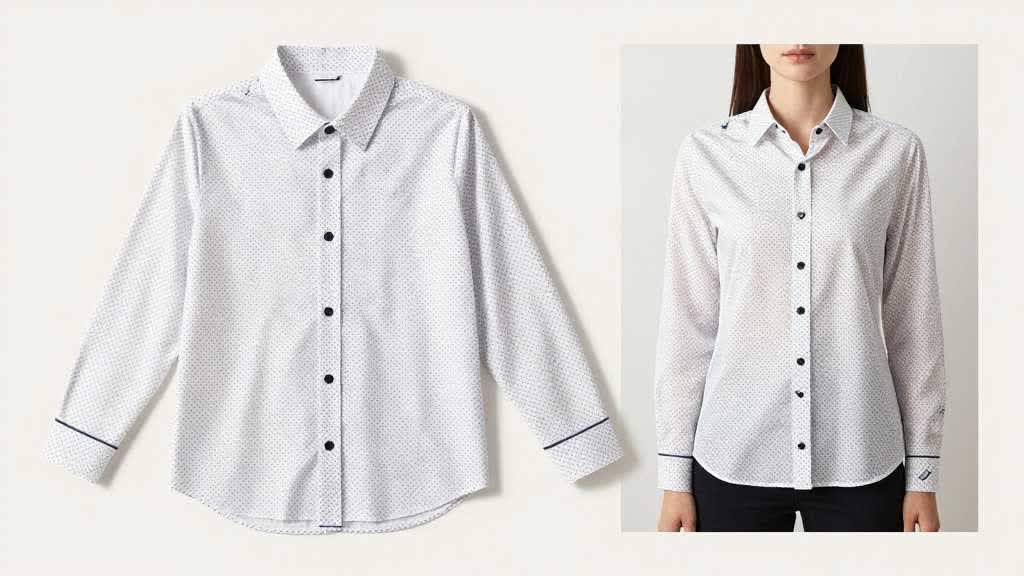
Flat lay to model photo AI is useful for apparel sellers, but it is risky to treat every garment the same. A cotton t-shirt, pleated skirt, structured blazer, yoga legging, and swimsuit all fail in different ways when moved from a flat product image onto a model.
That is why this article is not a general AI fashion model generator guide. Use AI Fashion Model Generator for Ecommerce when comparing tools. Use this page when you already have flat lay assets and need a garment-specific review system before publishing AI model photos.
Quick Answer
Flat lay to model photo AI works best when the original garment is clean, front-facing, and easy to separate from the background. Before publishing, review the output by garment type: neckline and sleeve shape for tops, drape and length for dresses, waistband and inseam for pants, lapel and shoulder structure for jackets, and coverage accuracy for swimwear. Reject outputs that invent fit, hide construction, or change the real SKU.
Why Generic Review Fails for Apparel
Apparel buyers judge fit, length, fabric weight, stretch, transparency, and how the garment sits on a body. A model image that looks polished but changes those facts can create returns.
Flat lay inputs also hide information. Body tension, sleeve opening, hem behavior, pocket depth, lining, and fabric movement are often missing from the source photo. AI can guess those details, but the guess may not match the product.
Use flat lay to model AI as a visual production shortcut, not as evidence that the garment fits that way.
Tops: Neckline, Sleeve, and Hem Truth
Tops are usually the easiest category, but they still need careful checks. Look at neckline depth, collar shape, shoulder width, sleeve length, cuff shape, and hem position. A crew neck cannot become a scoop neck. A boxy tee should not become fitted. A cropped tee should not be stretched into a standard length.
For t-shirts and basic tops, compare the model output against the flat lay at these points:
- neckline depth and symmetry
- shoulder seam position
- sleeve opening and sleeve length
- body width and hem shape
- print scale and placement
- fabric thickness around folds
If the model image improves the product by quietly changing the silhouette, treat it as a rejected PDP image.
Dresses and Skirts: Drape, Length, and Movement
Dresses and skirts fail when AI invents drape. A flat lay photo may show the print and outline, but not how fabric falls around the waist, hip, or hem. The model output must not change skirt length, slit height, waist placement, sleeve volume, or neckline coverage.
For dresses, use side-by-side review at full size. Check whether the hem lands in a believable place for the listed size. Check whether pleats, ruffles, wrap panels, or seams remain consistent. If the dress has a fitted waist, make sure construction details remain visible.
Treat one generated model pose as merchandising support, with size chart and real product evidence still carrying fit proof.
Pants and Leggings: Waistband, Inseam, and Stretch
Pants are harder than tops because shoppers care about rise, inseam, taper, pocket placement, and stretch. AI model photos can make a trouser look slimmer, longer, or more structured than the real product.
Check these points before publishing:
| Review area | What can go wrong |
|---|---|
| waistband | rise changes, waistband height shifts, drawcord disappears |
| inseam | pants become longer or cropped without reason |
| leg shape | straight leg becomes tapered or wide leg becomes fitted |
| pockets | pocket placement or size changes |
| fabric | stretch fabric looks rigid, denim looks too smooth |
For leggings and activewear, watch compression and transparency. A clean model render is not enough if the fabric behavior is inaccurate.
Jackets and Blazers: Structure Is the Main Risk
Structured garments are the highest-risk category for flat lay to model AI. Blazers, coats, denim jackets, and padded jackets rely on shoulder shape, lapel position, closure, lining, and thickness. AI can make these look more premium than the real SKU.
Review shoulder width, collar shape, lapel angle, sleeve volume, button position, zipper path, and pocket construction. If the garment has padding or quilting, compare the pattern carefully. A jacket image that changes structure may create a stronger visual, but it is no longer a reliable product image.
Swimwear and Intimates: Coverage Accuracy Comes First
Swimwear, underwear, shapewear, and tight activewear need stricter review. Coverage, strap width, cut height, seam position, and fabric tension must stay accurate. Reject AI model images that make the item more modest, more revealing, more supportive, or more fitted than the actual product.
If the SKU has multiple size or coverage variations, build separate review rules by variant.
Build Flat-Lay-to-Model Images in LoomaDesign
Use LoomaDesign when you need to turn clean product inputs into model-ready apparel visuals, then review the result against product truth. The AI Product Model Image Generator can support apparel model imagery, while AI Product Image Enhancer helps clean soft or compressed source photos before generation.
For a broader tool evaluation, use AI Fashion Model Generator for Ecommerce. For channel gallery planning, use AI Product Photography for Shopify and Amazon.
FAQ
Can AI turn flat lay clothing photos into model photos? Yes, but the output must be reviewed for garment truth. The generated image should not change fit, length, fabric, coverage, construction, or print placement.
Which garments work best for flat lay to model AI? Simple tops, basic dresses, and clean front-facing garments usually work better than structured jackets, complex draped pieces, sheer fabrics, or products with hidden construction.
Can I use AI model photos on a product detail page? Use them only after checking accuracy. They work better as merchandising or lifestyle support images than as the only evidence of fit.
What is the biggest risk with flat lay to model AI? The biggest risk is a convincing image that quietly changes the real product. Fit accuracy matters more than visual polish.