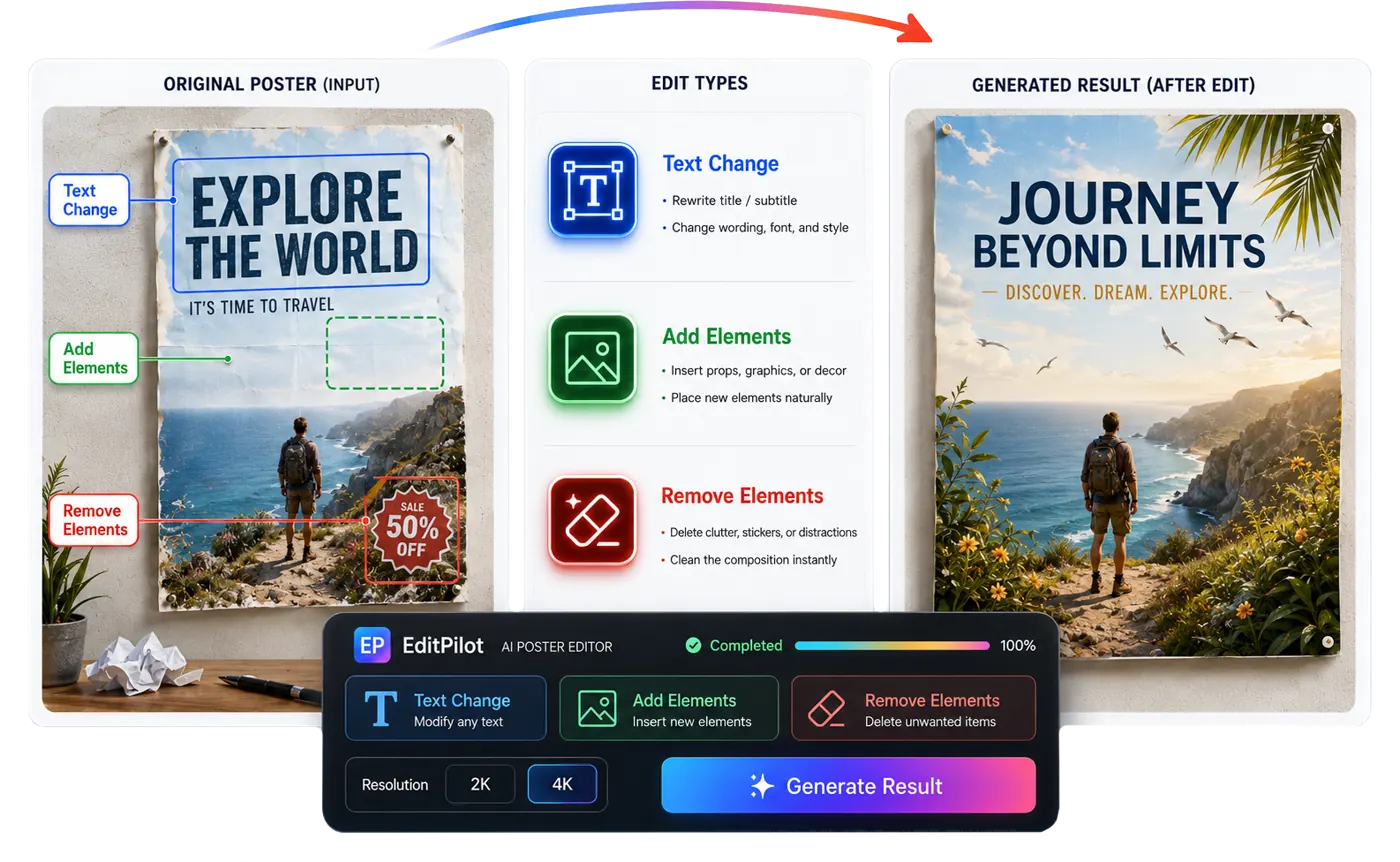
Remove unwanted text, logos, stickers, or badges from a selected area.

Targeted Image Editing Workflow
AI Product Image Editor
Select the exact area that needs work, then remove text or logos, replace an object, or revise a product graphic while keeping the rest of the image in place.
Quick answer
Use AI Product Image Editor when one part of an ecommerce image needs correction. Mark the area with a rectangle or brush, remove unwanted text or a logo, replace an object, then inspect the surrounding product details before applying the result.
Use cases
Where this helps ecommerce teams fastest
Change poster or banner text without rebuilding the full design.
Add or replace a product-related object inside a controlled selection.
Workflow
A clearer path from product input to usable output
Step 1
Upload the product image
Start with the poster, ad, listing visual, or product image you want to improve.
Step 2
Select the edit area
Use a rectangle or brush mask to cover the text, logo, object, or detail you want to change.
Step 3
Describe the edit
Choose remove element, text change, add or replace element, or a custom edit, then review the generated area before applying it.
Why Looma
What buyers need to understand before they try the tool
Why targeted editing is different from full regeneration
Many ecommerce visuals only need one precise correction, not a completely new image.
- Targeted edits help preserve the parts of the design that already work.
- Area selection reduces the chance of unwanted changes elsewhere in the asset.
- The workflow is better suited for polishing ads, posters, and listing graphics after the main concept is already built.
What the editor is designed to fix
The editor focuses on practical visual cleanup and revision tasks that happen after product creatives are drafted.
- Remove unwanted text or logos from selected parts of product images.
- Rewrite visible text in product posters and campaign images.
- Add props, graphics, or ecommerce details into a selected area.
How ecommerce teams can use it
Use the editor after a product image, A+ visual, ad concept, or generated creative needs targeted QA.
- Refine listing images before publishing them to marketplaces.
- Clean campaign assets before running paid or organic tests.
- Iterate faster on creative feedback without restarting the full workflow.
FAQ
Questions buyers usually ask before they click in
Related resources
Continue into the Looma content cluster
Clean Product InputsSolution
AI Product Photo Retouching
Clean product photos for ecommerce with LoomaDesign. Create sharper white-background images, cleaner edges, and more listing-ready product visuals.
Open resource
Enhance OutputsSolution
AI Product Image Enhancer
Sharpen soft product images and improve edge and texture clarity for ecommerce while checking labels, color, packaging, and SKU details.
Open resource
Create Custom AssetsSolution
Custom Image Generator
Generate custom product images for ecommerce campaigns, ads, and landing pages with LoomaDesign. Upload product inputs and create directed product visuals faster.
Open resource
Product Image Cleanup GuideBlog
How to Edit and Clean Up Product Images in LoomaDesign
A controlled LoomaDesign workflow for turning an existing product photo into an edited, enhanced, retouched, and transparent ecommerce asset.
Open resource