Clean supplier photos before uploading them to Amazon or Shopify.

Product Cleanup Workflow
AI Product Photo Retouching
LoomaDesign helps ecommerce teams turn rough product shots into cleaner listing assets with stronger edges, better presentation, and less manual cleanup.
Quick answer
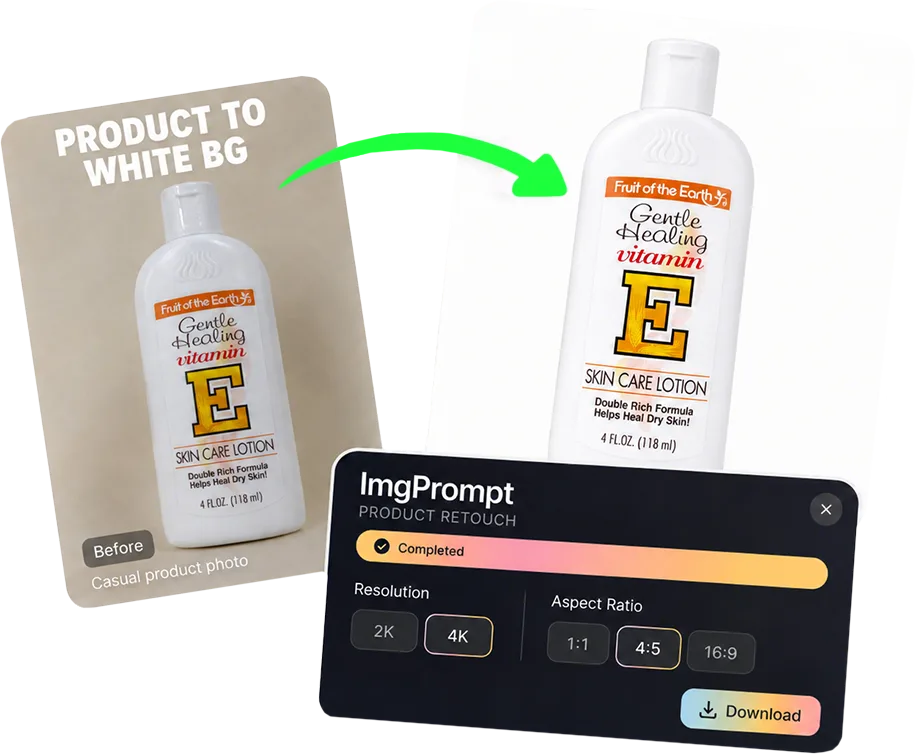
Use Product Retouching when the product is already photographed but needs a cleaner white-background version before listings, ads, A+ modules, or other visual workflows.
Use cases
Where this helps ecommerce teams fastest
Prepare product cutouts and white-background images for catalog use.
Improve source images before creating scenes, model images, or A+ content.
Workflow
A clearer path from product input to usable output
Step 1
Upload the product photo
Start with the product image you want to clean, polish, or prepare for marketplace use.
Step 2
Retouch for ecommerce
Improve the image while preserving the real product shape, color, label, and material details.
Step 3
Use it in the next workflow
Download the cleaned image or reuse it as an input for listing images, scenes, model visuals, or A+ modules.
Why Looma
What buyers need to understand before they try the tool
Why retouching still matters before generation
AI image generation works better when the product input is clean enough to understand.
- Cleaner edges reduce visual mistakes in later generated scenes.
- More accurate colors and labels help protect product trust.
- Consistent white-background images make catalog and marketplace workflows easier to manage.
Best fit for ecommerce teams
This page is for teams that already have product photos but need them to look more usable before launch.
- Amazon sellers cleaning marketplace listing assets.
- Shopify teams preparing catalog images at scale.
- Agencies that need cleaner inputs before producing richer creative assets.
How it connects to Looma workflows
Retouching is often the first step in a stronger product-image pipeline.
- Use it before Product Scene Image when the source photo is weak.
- Use it before Product Model Image when the item needs clearer product detail.
- Use it before A+ Content Image when the module needs a stronger product hero.
FAQ
Questions buyers usually ask before they click in
Related resources
Continue into the Looma content cluster
Enhance Source ImagesSolution
AI Product Image Enhancer
Sharpen soft product images and improve edge and texture clarity for ecommerce while checking labels, color, packaging, and SKU details.
Open resource
Next Visual WorkflowSolution
Amazon Lifestyle Image Generator
Turn plain product photos into cleaner lifestyle visuals for Amazon, Shopify, and marketplace listings with LoomaDesign’s AI scene workflow.
Open resource
A+ WorkflowSolution
Amazon A+ Content AI
Create Amazon A+ content faster with LoomaDesign. Turn product facts, selling points, and visual direction into cleaner A+ modules and launch-ready workflows.
Open resource