
Amazon Listing Images for Small Kitchen Appliances: Main Image, Scale, Detail, and A+ Flow
Small kitchen appliances are difficult to explain with one clean product photo. A shopper may like the look of an air fryer, blender, kettle, coffee grinder, or compact mixer, but the purchase decision usually depends on details that are easy to miss: counter size, capacity, controls, cleaning, included parts, safety, noise, power, and whether the product fits a real kitchen routine.
That is why Amazon listing images for small kitchen appliances need a category-specific sequence. The main image should identify the product clearly. The secondary images should remove the questions that stop a shopper from buying. A+ Content should extend that proof with deeper explanation, comparison, and use context.
Quick Answer
For small kitchen appliances, build the Amazon image set around six jobs: clean main image, counter-scale proof, control and feature closeups, parts and cleaning, real cooking or preparation context, and A+ Content images that explain the product without crowding the gallery.
Use a square, high-resolution main image with the product filling most of the frame. Then use secondary images to show what the appliance does, how large it is, what comes with it, what the buyer has to clean, and which product details justify the price.
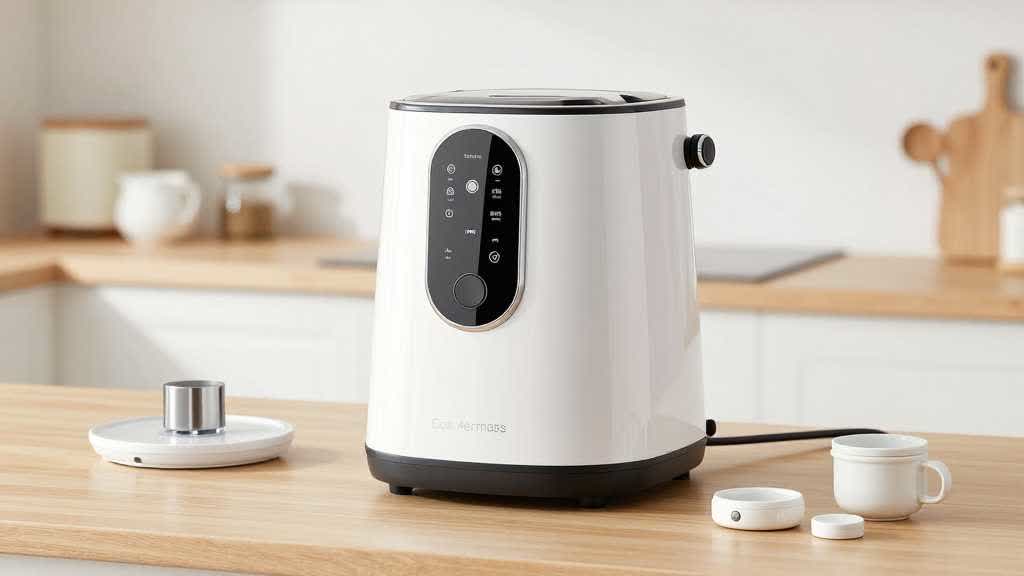
Why This Category Needs More Than a Pretty Hero Image
Small kitchen appliances create practical doubts. A shopper may wonder if a compact blender is strong enough, if an air fryer basket is easy to clean, if a kettle fits under cabinets, if a grinder is too loud, or if a mixer includes the right attachments.
Those doubts rarely disappear from a single white-background photo.
The listing image set should do the work that a store associate would do in person. It should show the product from the right angles, prove the important details, and make the size feel real before the shopper reaches the A+ section.
Amazon's product detail page guidance recommends high-quality images and at least four images that help shoppers understand the product. For kitchen appliances, four images is usually the floor, not the target. The stronger set normally needs main image, angle, detail, scale, lifestyle, parts, cleaning, and comparison support.
The Image Sequence I Would Use
A small kitchen appliance image set should have a clear order. The first few images answer fast recognition and fit questions. Later images support features, maintenance, and use cases.
| Image slot | Job | What to show |
|---|---|---|
| Main image | identify the product fast | front or three-quarter product on clean white |
| Angle image | show shape and controls | side/front view, handle, lid, basket, dial, cord position |
| Scale image | reduce size uncertainty | product on counter with cup, hand, plate, or cabinet context |
| Detail closeup | prove the value claim | control panel, blade, basket texture, heating plate, material |
| Parts image | show what is included | accessories, trays, cups, brush, manual, replacement parts |
| Cleaning image | reduce maintenance fear | removable basket, dishwasher-safe parts, wipe-down surface |
| Lifestyle image | show the use result | appliance in use with food, drink, or kitchen routine |
| A+ module | explain deeper claims | comparison, capacity, safety, feature proof, use steps |
This order gives the shopper a practical tour. The product becomes easier to understand before the A+ section adds a longer story.
Main Image Rules for Small Appliances
The main image has one job: make the product recognizable in search results and on the product page. For most Amazon categories, the main image should use a pure white background, show the actual product, avoid extra text or props, and fill a large share of the frame.
For small kitchen appliances, the main image should also avoid three common problems.
First, keep the handle, cord, lid, feet, and side profile visible. Those parts help shoppers understand shape and size.
Second, choose an angle that shows the controls. If the control panel is part of the product value, the shopper should be able to see it early.
Third, keep black, silver, and glossy finishes close to the real SKU. Over-smoothed reflections can make the product look premium in the image and cheap when it arrives.
Scale Images Should Feel Like a Real Countertop
Scale is one of the most important secondary image jobs for countertop appliances. A product may look compact in a cropped hero image and still feel too large on a small counter.
The scale image should answer the question before the shopper has to search the specs.
Useful scale references include:
- a standard dinner plate near an air fryer
- a coffee mug near a kettle or grinder
- a water bottle near a blender
- cabinet height or backsplash context
- a hand holding a removable part
- a clear capacity visual, such as cups, liters, or servings
Avoid scale scenes that look staged but teach nothing. A kitchen counter scene with no reference object may look nice, but it may not solve the buyer's size problem.
Detail Closeups Need to Prove Specific Claims
Small appliance listings often make claims about power, safety, capacity, cleaning, material, nonstick coating, blade quality, heating speed, or quiet operation. Detail images should support those claims.
A strong closeup is specific. Use it to show the blade design if the listing claims better blending, the removable basket if cleaning matters, the control panel if the appliance has presets, or the lid seal if safety is part of the pitch.
Use detail images for:
- control panel readability
- removable trays, baskets, cups, or lids
- blade or heating structure
- cord storage
- grip, handle, latch, hinge, or seal
- material finish
- safety lock or indicator light
- included accessories
The detail image should connect to a buyer question. Otherwise it becomes decoration.
Cleaning and Maintenance Deserve Their Own Image
Kitchen appliance buyers care about cleanup. A product can look useful and still lose the sale if the shopper imagines a difficult cleaning routine.
For air fryers, show the basket, tray, and wipe-down area. For blenders, show the cup, lid, blade base, and rinse flow. For kettles, show the opening, spout, filter, and interior access. For grinders, show the removable cup or brush if included.
This image can reduce return risk because it makes the routine visible. It also helps distinguish a product from competitors that only show lifestyle results.
Lifestyle Images Should Show the Result and the Kitchen
Lifestyle images for small appliances should avoid generic kitchen staging. The shopper needs to see the product doing its job.
For an air fryer, show the appliance with cooked food and a visible basket or tray. For a blender, show smoothie texture, cup handling, and where it sits after use. For a kettle, show pour angle, steam context, and counter placement. For a grinder, show beans, grounds, container, and cleanup.
The scene should still respect product truth. If the appliance is compact, place it in a kitchen where the counter scale feels believable. If the product has a basic finish, keep the surrounding materials close to the real SKU's price position.
How A+ Content Should Extend the Gallery
A+ Content should not repeat the image gallery. It should go deeper where the gallery runs out of space.
For small kitchen appliances, useful A+ modules include:
| A+ module | Best use |
|---|---|
| Capacity module | servings, cup size, basket size, real food amount |
| Use sequence | prep, operate, serve, clean |
| Comparison chart | model size, wattage, parts, settings, capacity |
| Safety module | lock, auto shutoff, heat protection, handle design |
| Cleaning module | removable parts, wipe-down surfaces, dishwasher-safe parts if true |
| Feature proof | controls, presets, heat flow, blade design, materials |
The LoomaDesign A+ Content AI workflow can help create those module images from product facts and buyer questions. The product detail page workflow helps keep the gallery and A+ section aligned.
QA Checklist Before Publishing
Before uploading small kitchen appliance listing images, review the set as if the shopper is comparing three similar products.
- Does the main image show the full appliance clearly?
- Is the background clean enough for Amazon's main image expectations?
- Is the product large enough in the frame?
- Are controls and important parts visible?
- Does one image show real counter scale?
- Does one image show what comes in the box?
- Does one image reduce cleaning or maintenance doubt?
- Does the lifestyle scene show actual use or result?
- Are colors, finish, and proportions consistent across images?
- Does the A+ section answer questions the gallery cannot cover?
This checklist keeps the image set from becoming a pile of attractive assets. Each image needs a reason to exist.
Build the Small Appliance Image Set in LoomaDesign
LoomaDesign helps sellers plan and create Amazon listing images as a product-page system. For small kitchen appliances, that means turning product specs, use cases, cleaning concerns, and buyer doubts into images that support the main gallery and A+ Content.
The useful LoomaDesign workflow starts with the appliance facts: capacity, dimensions, wattage, controls, included parts, cleaning method, and the buyer doubt most likely to stop purchase. Those facts decide which images to create. A compact blender needs scale and cup details. An air fryer needs basket, cleaning, control, and result images. A kettle needs pour, spout, base, and counter-fit proof.
It is useful when a team needs more than one polished visual. The stronger workflow creates main image directions, scale images, detail closeups, lifestyle scenes, A+ module visuals, and QA-ready drafts that can be reviewed before publishing.
For a broader A+ conversion workflow, read How to Use Amazon A+ Content to Improve Conversion Rate. For a general gallery sequence, read Amazon Listing Images Design: Main Gallery, Lifestyle, and A+ Flow.
FAQ
What image size should small kitchen appliance Amazon listings use?
Use high-resolution square images that support zoom. A practical production target is 2000 x 2000 pixels for the main image and key gallery assets, with clean crops and enough product detail for mobile and zoom review.
How many listing images should a small kitchen appliance have?
A strong set usually needs at least six to eight images: main, angle, scale, feature closeup, included parts, cleaning, lifestyle, and comparison or A+ support.
Should the main image include food or props?
For the main image, keep the focus on the product and follow Amazon category rules. Props and food are usually better for secondary lifestyle or use-result images.
What is the most important secondary image for small appliances?
Scale and cleaning are often the two highest-impact images. They answer practical questions that many shoppers cannot solve from specs alone.
Should A+ Content repeat the image gallery?
No. A+ Content should extend the gallery with deeper proof, comparison, use steps, safety details, cleaning explanation, and value support.
Sources and Data Points
- Amazon Ads, How to improve your product detail page for advertising: Amazon recommends high-quality product images, four or more images, zoomable image sizes, and A+ Content to help shoppers make informed decisions.
- Amazon, A+ Content: Amazon says Basic A+ Content can increase sales by up to 8%, while well-implemented Premium A+ Content can increase sales by up to 20%.