
Amazon Listing Images for Jewelry and Small Accessories: Macro Detail, Scale, Variants, and Trust Proof
Jewelry and small accessories are easy to make look attractive in a product photo and hard to make clear in an Amazon listing. The product may be tiny, reflective, delicate, textured, or sold in many finishes. A shopper may like the first image and still hesitate because scale, material, closure, stone size, packaging, or color is unclear.
That is why Amazon listing images for jewelry need a different workflow from larger products. The image set has to show beauty and proof at the same time. A clean main image helps the product compete in search. The secondary images need macro detail, scale, variant clarity, lifestyle context, and trust signals that reduce surprise after delivery.
Quick Answer
For jewelry and small accessories, plan Amazon listing images around five jobs: clean main image, macro proof, real scale, variant accuracy, and trust support. The main image should make the item easy to identify. Secondary images should show clasp, chain, stone, texture, finish, scale on body or hand, packaging, and color options without exaggerating the real product.
This category is less forgiving than many others. A small difference in size, color, plating, texture, or shine can change buyer expectations. The image workflow has to protect accuracy as much as it improves visual appeal.
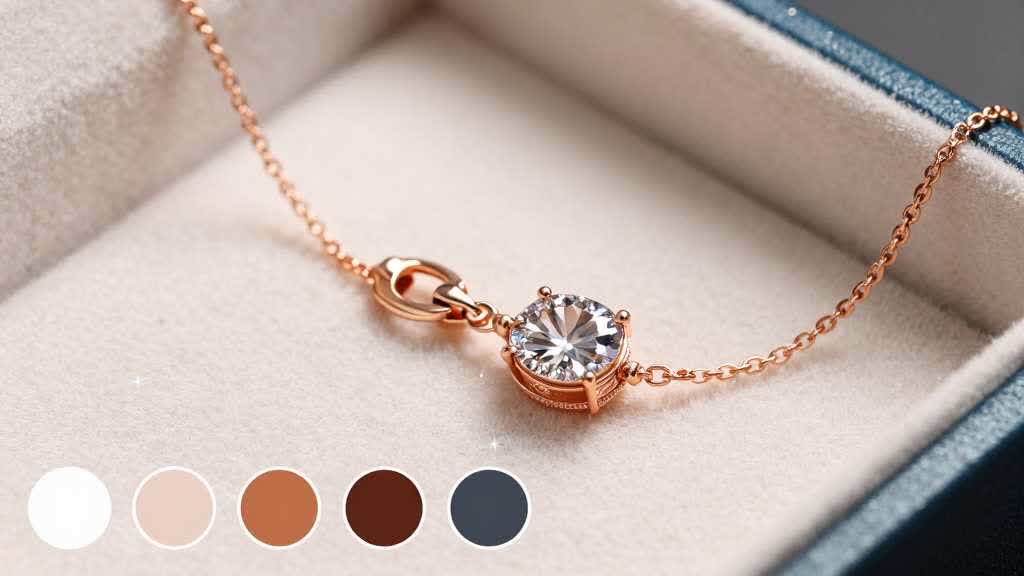
Why Jewelry Images Need Their Own Rules
Jewelry shoppers rely heavily on images because the product is tactile. They cannot feel weight, inspect clasp quality, compare metal finish, or judge stone size in person. The image set has to replace that inspection.
There are also more ways to mislead the shopper without meaning to. A macro shot can make a pendant look larger than it is. A bright reflection can make a plated finish look richer than the real SKU. A lifestyle crop can hide chain length. A color variant image can drift from the actual tone.
Amazon's jewelry style guidance emphasizes clean product presentation, accurate product representation, and category-specific image expectations. For sellers, the practical goal is simple: make the product desirable without making it look like a different product.
The Image Sequence I Would Use
A jewelry or small accessory listing needs both search clarity and buyer confidence. The order should move from identification to inspection.
| Image slot | Job | What to show |
|---|---|---|
| Main image | identify the item cleanly | product on white, clear silhouette, accurate color |
| Macro detail | prove quality | clasp, chain, stone setting, engraving, stitching, texture |
| Scale image | prevent size surprise | on hand, wrist, ear, neck, or next to a clear reference |
| Lifestyle image | show styling context | worn naturally, not over-cropped or over-glamourized |
| Variant image | help color or size choice | side-by-side finishes, sizes, sets, or bundles |
| Packaging image | support gifting and trust | box, pouch, card, care cloth, certificate if real |
| Care or material image | reduce doubt | plating, stainless steel, leather, fabric, waterproof note if true |
| A+ module | add deeper proof | comparison, material story, gifting, care, brand promise |
The sequence should not force a shopper to guess. Each image should answer one question that matters for a small item.
Main Image: Clean, Large, and Honest
The main image has to work at thumbnail size. Jewelry can disappear in search results if the product is too small in the frame, too pale, or too dependent on fine detail.
Use a clean white background and make the product large enough to read its shape. Keep reflections under control, especially for silver, gold, glossy enamel, watch faces, stones, and polished hardware. Over-sharpened stones and metal edges can make the product look artificial.
For sets, show exactly what the buyer gets. If the listing sells one pair of earrings, keep the image from implying a larger bundle. If the product includes a chain, charm, box, or pouch, make that clear in secondary images unless the category main image rules allow it.
Macro Detail Should Prove Quality
Macro images are powerful in jewelry listings because they let the shopper inspect the product. They can also create unrealistic expectations if the crop hides the item's real scale.
Use macro detail for quality proof:
- clasp and closure
- chain links
- stone setting
- pendant edge
- engraving
- plating or finish
- watch crown, strap, buckle, or dial
- stitching or hardware on small accessories
- texture on leather, fabric, or metal
The macro image should usually sit near a scale image. That pairing helps the shopper understand both detail and size.
Scale Images Reduce Returns
Small products often create disappointment when the shopper expected a different size. A necklace pendant, watch face, ring, earring, charm, or small pouch can look much larger in a cropped photo than it feels in real life.
Scale images should show the item in normal use. A necklace should sit on a neck or collar area. Earrings should show ear scale. A bracelet or watch should show wrist fit. A ring can show hand scale. Small accessories can use a palm, pocket, key, phone, or bag context when the reference is natural.
Avoid scale images that use unrealistic model proportions or forced perspective. The image should lower return risk, not create a more flattering illusion.
Variant Images Need Strict Color QA
Jewelry and accessories often sell in gold, silver, rose gold, black, leather brown, navy, or multiple gemstone colors. Variant images can help shoppers choose quickly, but they can also create color complaints.
Use one approved lighting setup for all variants. Keep the crop, angle, shadow, and background consistent. One color should not look more premium because it was lit differently. If the product has a warm metal finish, avoid editing it until it becomes a different shade.
For color sets, a side-by-side variant image can be useful, but each variant should still have its own clear product image. Shoppers need to see the exact SKU they are choosing.
Packaging and Gift Context Matter
Jewelry is often bought as a gift. Packaging can influence trust and perceived value, especially for affordable items that need to feel presentable.
Show the box, pouch, card, care cloth, or certificate only if it is included. This is not a place for vague brand theater. If the item arrives in simple packaging, show simple packaging cleanly. If the item includes care instructions or a warranty card, make that visible in a secondary image or A+ module.
Gift context can help, but the product should remain the focus. A lifestyle image with hands, fabric, mirror, or table setting should not hide the item.
A+ Content for Jewelry and Accessories
The gallery has limited room. A+ Content can explain the product's material, care, size range, gifting, and variant structure in more detail.
Useful A+ modules include:
| A+ module | Best use |
|---|---|
| Material module | plating, steel, silver, leather, stone, fabric, or finish details |
| Size guide | chain length, pendant size, watch face, strap size, ring size context |
| Care guide | water exposure, storage, cleaning, polishing, tarnish prevention if applicable |
| Gift module | packaging and occasion context |
| Variant chart | finishes, sizes, bundle options, set contents |
| Detail proof | clasp, stone setting, texture, engraving, strap, buckle |
The LoomaDesign product detail page workflow can help teams connect the gallery and A+ modules into one product explanation. For A+ module production, the Amazon A+ Content AI workflow helps turn material facts, detail proof, and buyer questions into visual assets.
QA Checklist Before Publishing
Jewelry QA should be strict because small visual differences can change buyer trust.
- Does the main image show the exact item being sold?
- Is the product large enough to read in search results?
- Does the image preserve the real color and finish?
- Is there a scale image that prevents size surprise?
- Are macro details paired with normal-scale context?
- Do all variants use consistent lighting and crop?
- Is packaging shown only if included?
- Are lifestyle images clear enough to show the product?
- Does A+ Content explain material, care, size, or gifting without repeating the gallery?
- Has the final image set been checked on mobile?
Good jewelry images make the product feel desirable and predictable. That second word matters. Predictable products get fewer unpleasant surprises after delivery.
Build Jewelry Image Sets in LoomaDesign
LoomaDesign helps sellers plan jewelry and accessory images around buyer questions and connected photo decisions. It can support main image directions, macro detail visuals, scale images, variant boards, packaging scenes, and A+ module concepts.
The workflow is useful when a seller has many small SKUs that need consistent image logic. A necklace, bracelet, watch, ring, charm, and pouch may all need different images, but they can share the same QA standard: main image clarity, detail proof, scale, color accuracy, and mobile readability.
Use LoomaDesign when the product team already has the real SKU and needs a faster image system. Start with the approved product reference, create macro images for the details that affect trust, create one scale image that prevents size complaints, then build variant and packaging visuals only from facts that are true for the listing.
For a broader image order, see Amazon Listing Images Design: Main Gallery, Lifestyle, and A+ Flow. For image quality recovery, see How to Fix Pixelated Product Photos for Ecommerce.
FAQ
What should the main image show for jewelry on Amazon?
The main image should show the exact item clearly on a clean background, with accurate color and enough size in the frame for search visibility. Category rules can vary, so always check the applicable Amazon style guide.
Why are macro images important for jewelry listings?
Macro images help shoppers inspect clasp quality, stone setting, chain links, engraving, material texture, and finish. Pair them with scale images so the product keeps a believable size.
Should jewelry listings include model images?
Model images can help show scale and styling context. They are usually better as secondary or lifestyle images, not as a replacement for a clear product-focused main image.
How should sellers show color variants?
Use consistent lighting, angle, crop, and background for every variant. Color QA matters because small differences in metal tone or stone color can lead to disappointed buyers.
What A+ Content works best for jewelry?
Material proof, size guide, care guide, gift packaging, variant chart, and detail closeup modules are usually more useful than broad lifestyle banners.
Sources and Data Points
- Amazon, Jewelry Style Guide: category-specific image guidance for jewelry product presentation.
- Amazon Ads, How to improve your product detail page for advertising: Amazon recommends high-quality images, four or more images, zoomable image sizes, and product detail content that helps shoppers make informed decisions.