
AI Product Background Generator for Ecommerce: White, Lifestyle, and A+ Scenes Without Losing SKU Accuracy
An AI product background generator for ecommerce can turn a plain product photo into a white-background main image, a clean detail shot, a lifestyle scene, and a product detail page module. That sounds simple until the same product starts looking different from image to image.
The background changes how large the item feels, how premium the material looks, how easy the product is to understand, and whether the buyer believes the image.
Quick Answer
Use an AI product background generator after the product itself is already clean, sharp, and accurate. Build the image set in three layers: a plain white or neutral background for product recognition, a controlled detail background for texture and scale, and a lifestyle background for use context.
Every background should be judged against the real SKU. Check color, shape, logo, material, shadows, scale, and included parts before publishing. A beautiful scene can still hurt conversion if it makes the product look larger, glossier, softer, or more premium than the item a customer will receive.
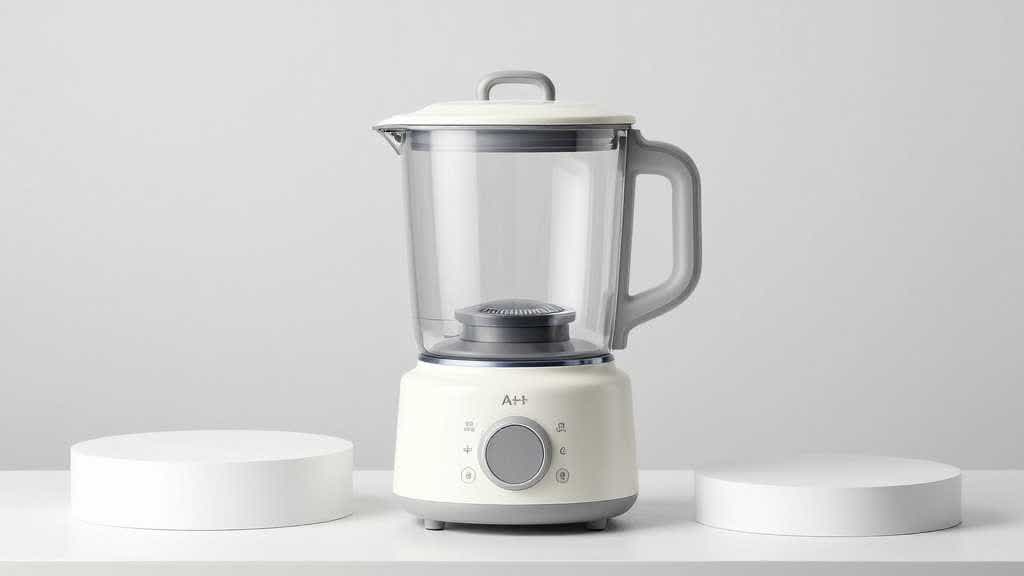
Why Background Choice Matters More Than It Looks
Product background AI is often sold as a speed tool. Upload a product photo, choose a style, generate a scene, publish the image.
That is useful for ideation, but ecommerce images have a stricter job. Shoppers judge the product first. They are trying to understand it fast enough to decide whether it belongs in the cart.
A clean white background helps search result recognition. A neutral surface can make material and color easier to inspect. A lifestyle scene helps a shopper imagine the product in use. An A+ Content module can explain a benefit, comparison, setup, or use case.
The problem starts when those backgrounds are chosen by mood alone. A marble counter can make a cheap kitchen tool look heavier than it is. A luxury bathroom can make a plastic beauty bottle look like premium glass. A wide living room scene can make a small diffuser look too large. A dark editorial background can hide the edge, finish, or packaging.
Backgrounds should reduce buyer uncertainty. If they create new uncertainty, they are decoration.
Choose the Background by Image Job
Start by assigning a job before generating the image.
| Image job | Best background type | What to watch |
|---|---|---|
| Main product image | pure white or very light neutral | product fill, edge clarity, shadow, compliance |
| Detail closeup | neutral studio surface | texture accuracy, color shift, focus |
| Scale proof | counter, hand, shelf, model, table | realistic size relationship |
| Lifestyle use | kitchen, bathroom, desk, travel, home, outdoor scene | product visibility and real use context |
| A+ module | clean editorial background or split layout | readable benefit proof, not tiny text |
| Variant image | identical background across colors or bundles | lighting consistency and color accuracy |
| Ad/social crop | cleaner lifestyle scene | product remains the subject |
A background that works for one image can be wrong for another. A lifestyle kitchen scene may be good for an air fryer use image, but a white main image still needs clean edges and enough product fill. A soft bedroom scene may suit a blanket, but a zipper closeup for a travel bag needs sharper surface detail.
Category Examples
For beauty and skincare, backgrounds should protect color and packaging. A bottle photographed against warm stone may look more expensive, but the label, shade, and texture still need to remain clear. If the product has a serum texture, a cream swatch, or a shade range, the background should keep attention on the formula, not the bathroom props.
For bags and accessories, the background needs to support scale and material. A backpack on a plain surface can identify the item, while a body-scale image shows fit. Detail shots should show zippers, stitching, pockets, lining, and hardware. If the AI background adds a dramatic travel scene but hides the strap structure, it weakens the listing.
For small kitchen appliances, backgrounds should show counter fit, controls, cleaning, included parts, and result. A bright kitchen scene can help, but the shopper still needs to know whether the appliance fits under a cabinet, how large the basket is, and whether the control panel is readable.
For jewelry and small accessories, the risk is scale. Macro backgrounds can make the product look larger than it is. Pair closeups with hand, neck, wrist, ear, packaging, or ruler-style scale references so the buyer reads size correctly.
Workflow for AI Product Backgrounds
Start with the source product image. The product should be clear enough for the AI tool to preserve the outline, color, material, and key details.
Then build a small set, not one image.
- Create the clean product anchor. Make a white-background or neutral studio image first. This becomes the reference for color, crop, shadow, and product shape.
- Generate one detail background. Use a quiet surface that supports texture and material inspection. Avoid heavy props around small details.
- Generate one scale image. Add a hand, countertop, model, shelf, or common object only when scale affects purchase confidence.
- Generate one lifestyle scene. Choose a real use setting for the category. Keep the product large enough to inspect.
- Build one A+ or PDP image. Turn a claim into visual proof, such as easy to clean, travel-ready, premium material, compact size, or compatible with a routine.
- Review the set together. Check whether all images show the same SKU and whether the backgrounds feel like one brand, not five unrelated campaigns.
Each image should earn its background choice. Main images need recognition, detail images need inspection, scale images need proportion, and lifestyle images need believable use.
Common Mistakes
The first mistake is using a luxury background to compensate for a weak product photo. Better presentation helps, but it cannot fix blurry edges, wrong color, missing labels, or unclear product shape.
The second mistake is letting AI change the product. The background may look right while the product quietly changes. Handles become thinner. Buttons disappear. Stitching turns into a different pattern. The logo becomes distorted. A matte finish turns glossy. Those are product accuracy issues, not style choices.
The third mistake is using lifestyle scenes too early. A lifestyle scene can increase desire, but it should come after the product identity is clear. If the buyer cannot inspect the item, the scene is doing too much work.
The fourth mistake is ignoring mobile. A background that looks elegant on desktop can become visual clutter in a small gallery thumbnail. The product still needs to stand out when the image is reduced.
QA Checklist Before Publishing
Review every AI product background with the real SKU next to it.
- Is the product color still accurate?
- Did the material finish change?
- Are logos, labels, buttons, seams, ports, handles, straps, and clasps intact?
- Does the shadow match the scene?
- Does the scale look believable?
- Are any accessories shown that are not included?
- Does the image answer a buyer question?
- Is the product still clear on mobile?
- Does the background match the category and price point?
- Does the full image set feel consistent?
If an image fails one of these checks, regenerate or edit it before publishing. A background should support the product, not rewrite it.
Choose Ecommerce Backgrounds in LoomaDesign
LoomaDesign is useful when a seller needs more than one attractive background. It can help create a controlled product image set: white-background images, scene replacement, detail shots, lifestyle images, A+ Content visuals, and product detail page assets.
The scene replacement tool is the natural starting point for AI product backgrounds. The white background workflow helps create cleaner main images, while the product detail page workflow connects backgrounds to a broader PDP image set.
For sellers starting with one source image, the guide on turning one product photo into a full ecommerce image set shows how background work fits into the wider production process.
Try this workflow when background choice is the main problem:
- Create one white or light-neutral anchor image for product recognition.
- Generate one quiet detail background that protects texture and color.
- Generate one scale image only when size affects buyer confidence.
- Generate one lifestyle scene that matches the category, price point, and use case.
- Review all outputs together so the product keeps one SKU identity across the set.
FAQ
What is an AI product background generator?
It is a tool that changes or creates the background around a product photo. In ecommerce, it is often used for white-background product images, lifestyle scenes, detail backgrounds, product page modules, and ad crops.
Should every ecommerce product use lifestyle backgrounds?
No. Lifestyle backgrounds are useful when use context matters. Main images, detail images, variant images, and scale images often need cleaner backgrounds so shoppers can inspect the product.
Can AI backgrounds replace product photography?
They can reduce extra scene shoots when the product photo is already accurate. Products with complex labels, reflective materials, exact color requirements, or high return risk may still need additional reference photos.
What background is best for product photography?
Background choice depends on the job. Use white or light neutral for recognition, quiet surfaces for detail, realistic settings for use context, and clean editorial layouts for A+ or PDP modules.
How do I keep AI product backgrounds from looking fake?
Use a clear source photo, keep shadows realistic, avoid over-styled scenes, check scale, and compare the output against the real SKU before publishing.
Sources and Data Points
- Amazon Ads, How to improve your product detail page for advertising: Amazon recommends high-quality product images, multiple images, zoomable assets, and A+ Content to help shoppers make informed decisions.
- Amazon Ads, How to use AI to generate images: Amazon's guidance for AI image generation emphasizes concise prompts, product-centered scenes, and prompt refinement.
- Shopify, Ecommerce Product Photography: A Guide for Better Product Images: Shopify covers product photography setup, background choices, lighting, and ecommerce image planning.