
Google Merchant Center AI Performance Insights: 2026 Seller Guide
Google's AI Performance Insights report gives selected Merchant Center accounts a view of organic product visibility in AI Mode and AI Overviews. The report covers share of voice, shopping-journey stages, frequently used product terms and popular structured attributes. As of August 2026, Google describes it as a limited U.S. pilot, with expansion to Australia, Canada, India and New Zealand planned in the coming months.
The report does not show that a better product image directly raises AI visibility. Google has published no such causal ranking claim. Its useful role is narrower and more practical: it identifies the conversations and attributes associated with demand, then helps a merchant find products whose data is incomplete. The seller still needs to check whether the feed, landing page and images describe the same SKU accurately.
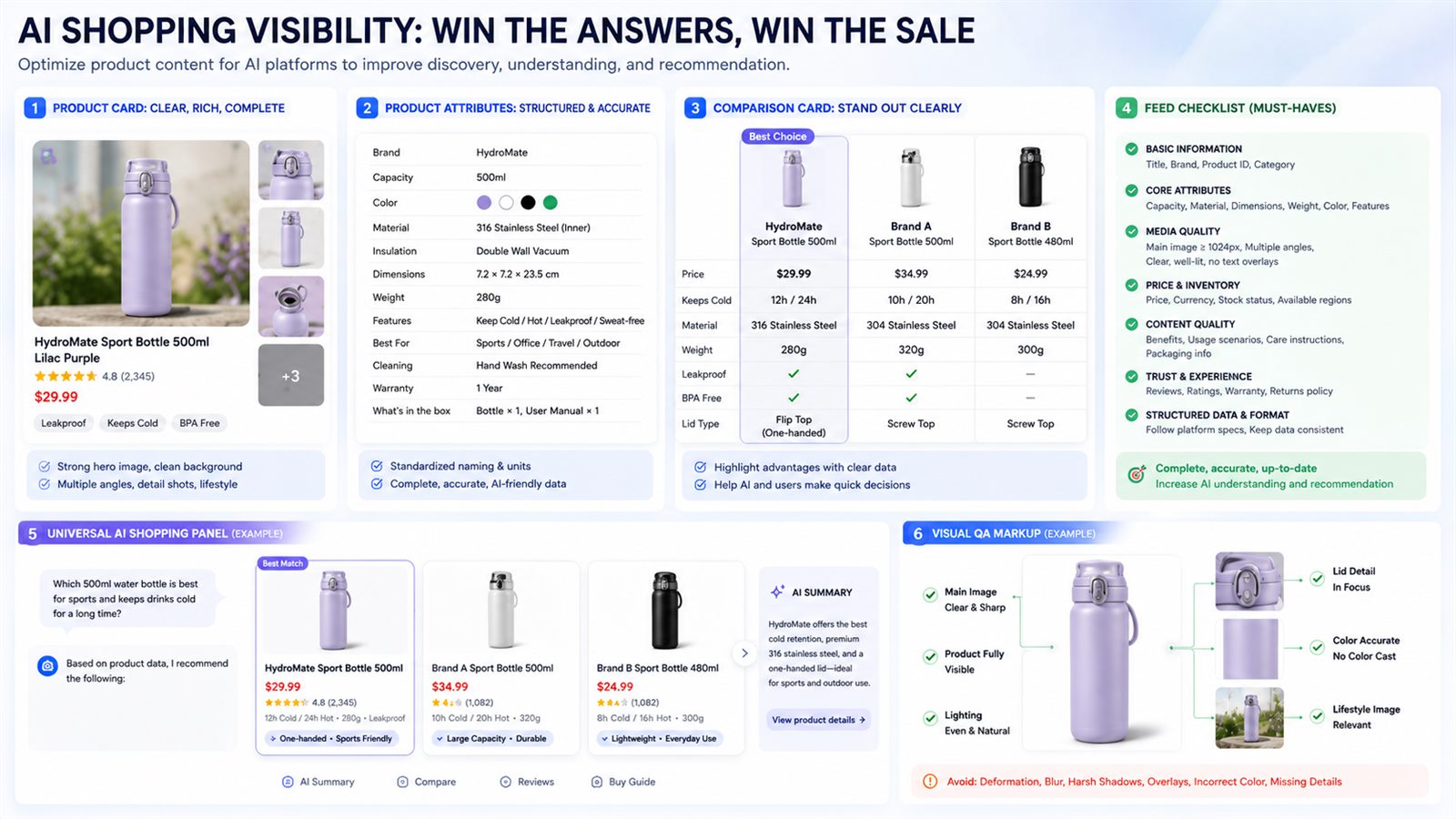
What Google has released in 2026
Google announced AI Performance Insights on May 20, 2026 and published a Merchant Center help page on May 27. The first announcement described a view of brand performance on AI surfaces, including share of voice against similar brands. The current help documentation is more precise. It says the pilot measures organic AI traffic and covers AI Mode and AI Overviews. Paid Ads traffic is excluded.
Access also remains restricted. Eligible users can find the report under Analytics → Products → AI performance. Google chooses the competitor set used for benchmarking, and merchants cannot change it. A zero share-of-voice value can mean the account lacks enough impressions. A 100% value can appear when Google has insufficient competitor data. Those conditions matter because either number can be misread without checking the report notes.
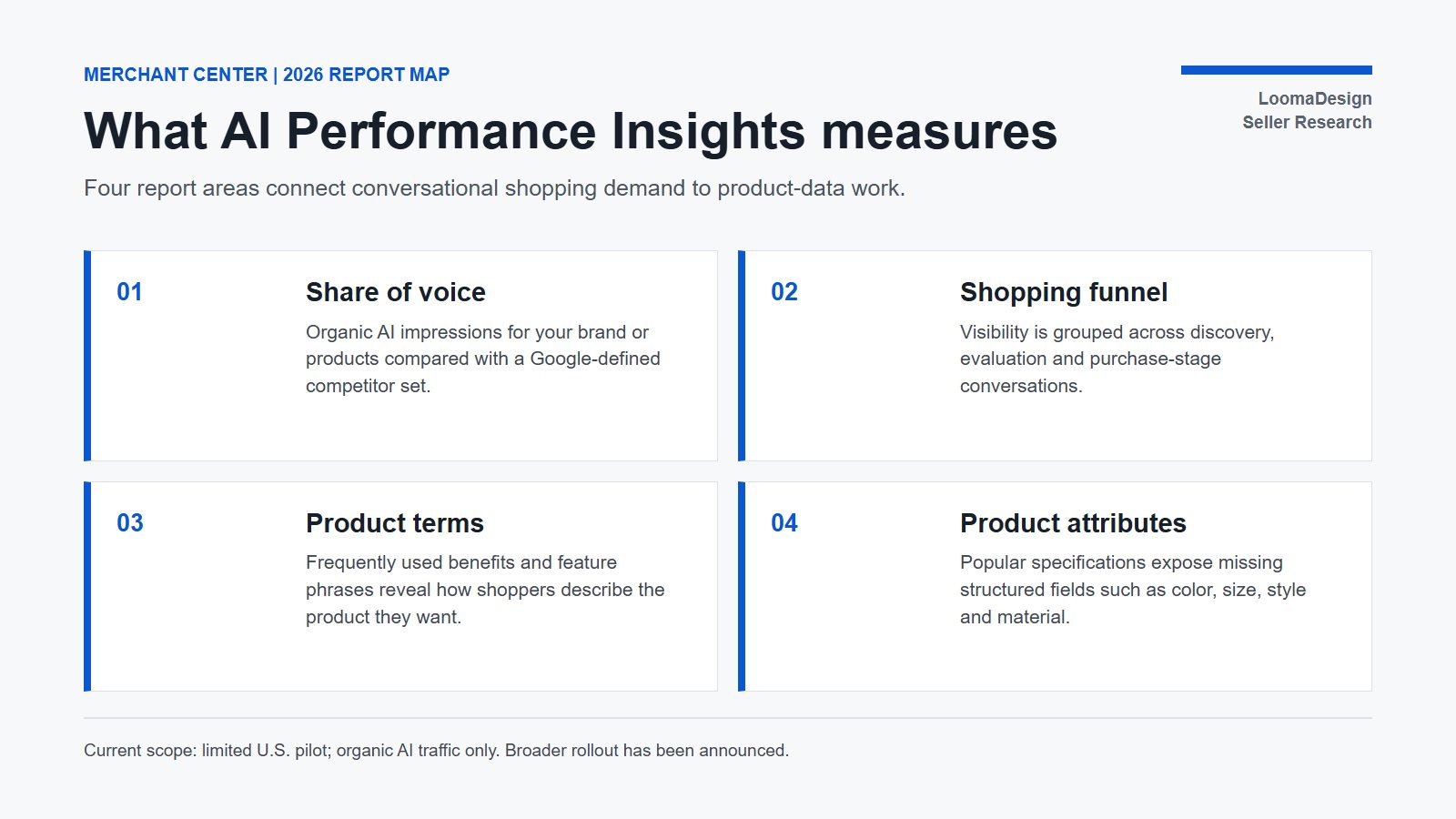
| Report area | What Google says it contains | Seller decision it can support |
|---|---|---|
| Share of voice | AI impressions for the brand or product divided by impressions across the brand and its competitor set | Find categories where visibility trails the benchmark |
| Shopping journey | Discovery, evaluation and purchase phases | See where the product stops appearing as queries become more specific |
| Product terms | Frequently used benefits or feature phrases in conversational searches | Compare demand language with relevant titles and descriptions |
| Product attributes | Popular specifications and an attribute completeness view | Locate SKUs missing structured color, size, style, material or other supported values |
Google notes that individual conversations can map to more than one journey stage. The report also shows trends and recommendations, but it does not reveal every query or expose a complete ranking model. It should be treated as a diagnostic view, not a score that can be optimized in isolation.
What the data proves, and what it does not
AI Performance Insights can show that shoppers use a term, that a brand receives a share of eligible organic AI impressions and that some products lack structured attributes. It cannot establish why a particular answer cited one merchant, why another product ranked above it, or whether an image edit caused a visibility change.
That distinction prevents a common reporting mistake. If “maximum cushioning” appears as a popular term and several shoes lack a cushioning-related description or supported attribute, the merchant has a clear data task. Adding the phrase to every product, changing unrelated images or rewriting an entire catalog would go beyond the evidence.
Google's product documentation supports a controlled response. Product structured data and Merchant Center feeds can work together to help Google understand and verify product details. Titles and descriptions should identify the item accurately. Descriptions may include visual characteristics such as shape, pattern, texture and design. Images must match submitted color, pattern and material values. These are documented product-data requirements; they are not a promise of AI ranking gains.
Turn the report into a SKU-level audit
Start with one product group where the report shows a meaningful term, attribute gap or weak share of voice. Export the affected products and compare each SKU across four places: the Merchant Center feed, the structured data on the landing page, the visible product copy and the image set.
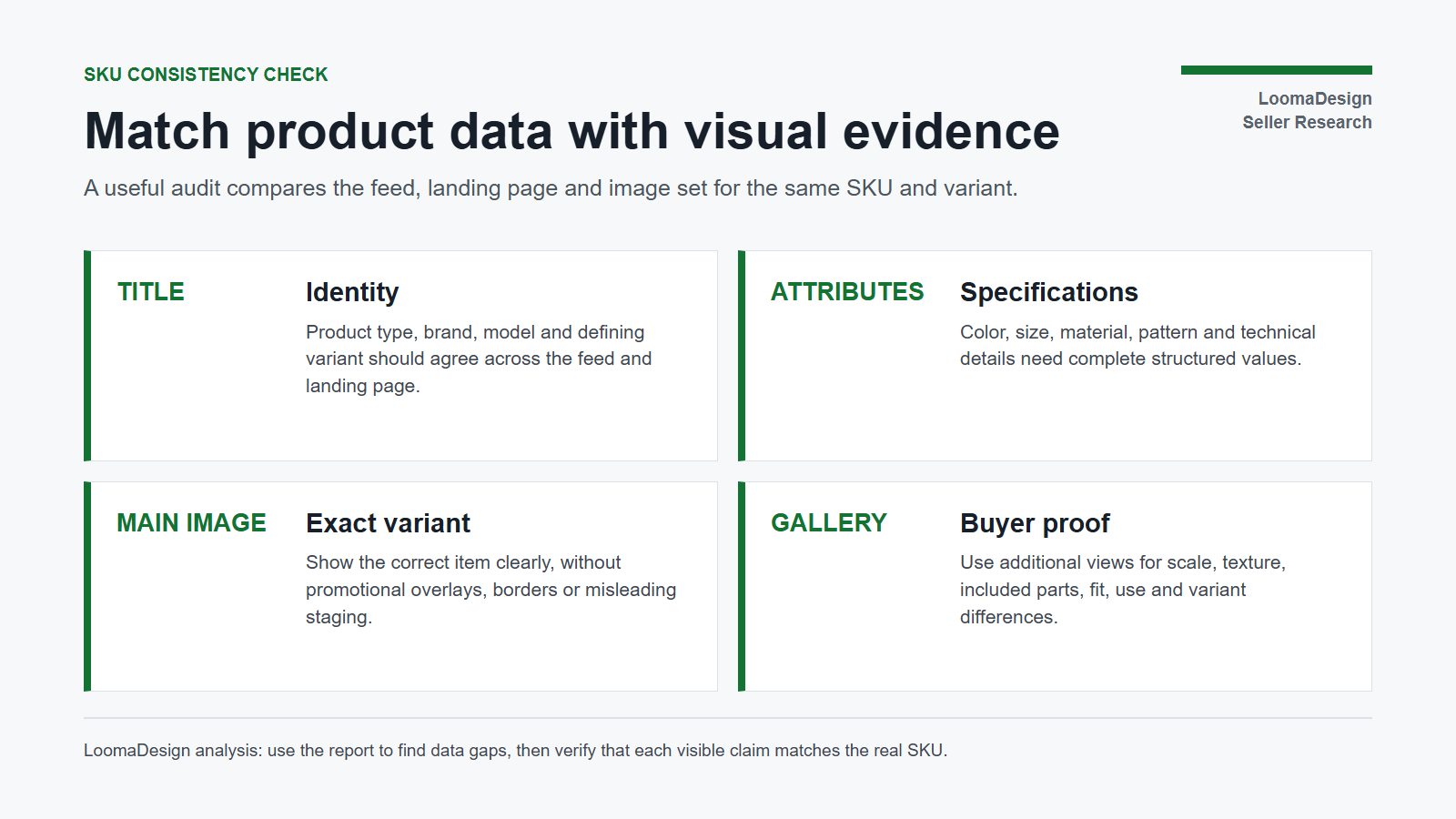
| Check | Pass condition | Common failure |
|---|---|---|
| Product identity | Brand, model, product type and SKU refer to one item | Generic title or a model mismatch |
| Variant | Color, size, material and pattern agree everywhere | Main image shows a different color from the feed |
| Availability and price | Feed and landing page stay synchronized | AI or Search result leads to stale product data |
| Main image | Exact product, clear view, compliant background and no promotional overlay | Composite, watermark or incorrect customized state |
| Additional images | Scale, details, included parts and use are shown accurately | Attractive scenes that hide dimensions or imply unsupported use |
| Structured data | Product and offer fields match visible page content | Markup contains values a shopper cannot verify on the page |
A practical review takes one term at a time. If shoppers frequently ask for “machine washable,” confirm which SKUs support the claim, add the correct attribute or description only to those products, and show care information or construction details where useful. If material is missing, fix the structured value before producing a generic lifestyle scene. If the image shows a black variant while the feed says navy, correct the identity conflict before expanding the gallery.
LoomaDesign's role begins after the product facts are locked. The Product Detail Page Image tool can organize feature, scale, comparison and detail images around buyer questions. The Additional Product Image tool can help fill a specific gallery gap. Every generated output still needs a check against the source SKU, packaging, color and included parts.
Image requirements already changing in 2026
Google's 2026 product-data update adds a concrete deadline that applies beyond the AI Performance Insights pilot. Warnings for images below the new minimum began on April 14, 2026. Starting January 31, 2027, images submitted through image_link and additional_image_link must be at least 500 × 500 pixels across product categories and marketing methods. Google recommends images around 1500 × 1500 pixels or larger for coverage across listing formats.
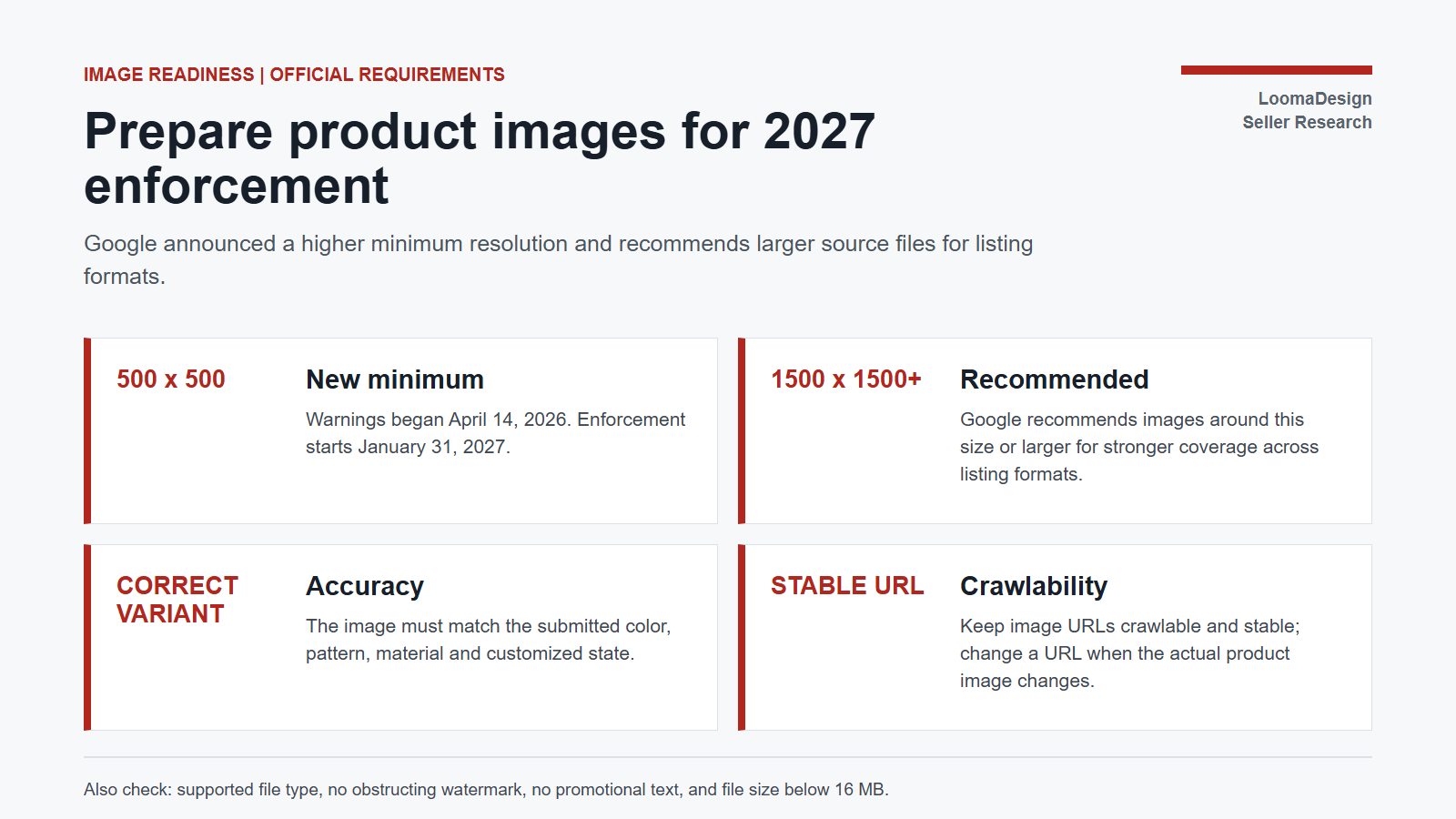
The main image must display the product accurately and use a supported file type. Google prohibits promotional text, obstructing watermarks, borders and incorrect product images. For color variants, the submitted image needs to show the corresponding color. Additional images may show the product in use, a close detail or part of a bundle. Google also recommends stable, crawlable image URLs and a file size below 16 MB.
For a large catalog, the efficient order is to fix compliance first, identity conflicts second and missing buyer proof third. Upscaling a poor supplier thumbnail may meet a pixel threshold while preserving blur or invented detail. A product image enhancer is useful when the source contains recoverable detail, but it cannot verify a label, texture or accessory that was not visible in the source.
A 30-day measurement plan
Use a fixed product group and record a baseline before editing. Save the date, eligible country, share of voice by journey stage, relevant product terms, missing attributes and the affected SKU count. Keep feed corrections separate from visual changes when possible so the result remains interpretable.
During week one, correct missing or contradictory product data. During week two, repair main-image compliance and exact-variant issues. During weeks three and four, add only the detail, scale or use images needed to answer the product terms found in the report. Track Merchant Center diagnostics, organic AI visibility and landing-page engagement. A short observation window can reveal whether errors fell, product coverage improved and the selected pages performed differently from an unchanged comparison group. It cannot establish the cause of every change.
Questions sellers are asking
Does AI Performance Insights include paid Shopping ads?
No. Google's current documentation says the report is limited to Organic AI traffic. Paid Ads traffic is not included.
Is the report available in every Merchant Center account?
No. As of August 2026, Google describes a limited U.S. pilot. It has announced expansion to Australia, Canada, India and New Zealand.
Do better product images increase AI share of voice?
Google has not published a direct causal ranking claim. Accurate images help satisfy Merchant Center requirements and keep the visual product representation consistent with submitted attributes. The report should be used to identify demand and data gaps, not to claim that an image edit guarantees more AI impressions.
Should every popular term be added to every product description?
No. Add a term only when it accurately describes that SKU and helps a shopper understand it. Unsupported claims create feed, page and image inconsistencies.
Sources
- Google Merchant Center Help, About AI performance insights, accessed August 2026
- Google Merchant Center Help, Insights for AI-powered shopping experiences coming soon, May 27, 2026
- Google, How we're helping retailers thrive with new UCP and AI tools, May 20, 2026
- Google Merchant Center Help, Merchant Center product data specification update 2026
- Google Merchant Center Help, Image link requirements
- Google Merchant Center Help, Additional image link requirements
- Google Search Central, Introduction to Product structured data