Create model-led visuals for apparel and fashion product listings.

On-Model Visual Workflow
AI Product Model Image Generator
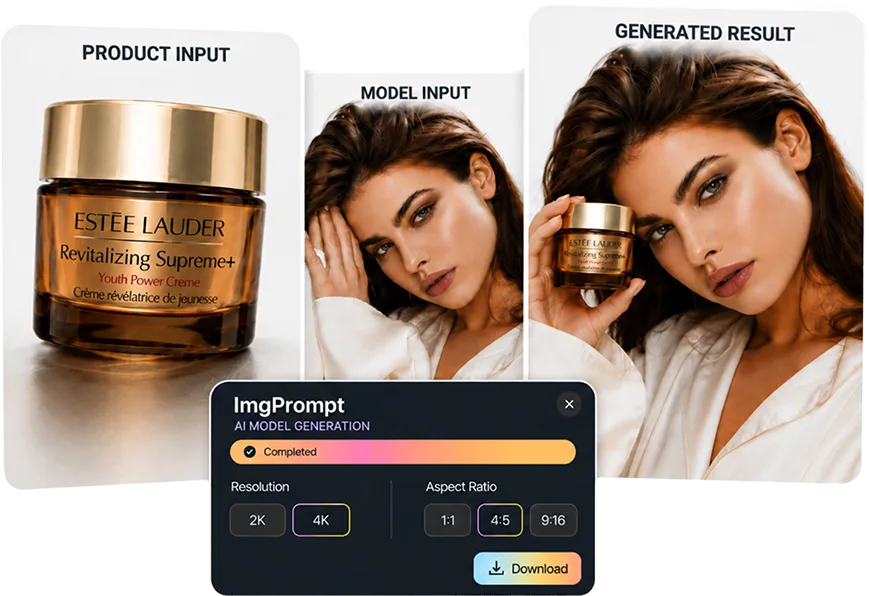
LoomaDesign helps ecommerce teams create model-led product visuals faster when a plain product shot is not enough to show fit, wear, or presentation.
Quick answer
Use Product Model Image when buyers need to see the item on a person or in a model-led visual, especially for apparel, accessories, and product categories where scale and styling matter.
Use cases
Where this helps ecommerce teams fastest
Generate more product presentation variants without a new shoot.
Support ads and landing pages that need a human visual anchor.
Workflow
A clearer path from product input to usable output
Step 1
Upload the product image
Start with a clean product asset that clearly shows the item you want represented.
Step 2
Set the model direction
Choose the model or visual direction that fits the product, audience, and campaign.
Step 3
Generate the model image
Create an on-model visual that can support listings, ads, landing pages, or catalog tests.
Why Looma
What buyers need to understand before they try the tool
When model imagery is more useful than a packshot
Some product categories sell better when buyers can understand scale, fit, or human context.
- Use model images when the product is worn, carried, styled, or judged by fit.
- Use them when product-only images feel too abstract for the buying decision.
- Use them to create more ad and landing-page variants from existing assets.
What the output should protect
A useful model image should improve presentation without losing product accuracy.
- Keep product shape, color, material, and major details believable.
- Avoid unrealistic hands, broken body structure, or awkward product placement.
- Make the final image practical for ecommerce review and publishing.
Where it fits in the content system
Product Model Image sits between clean product inputs and richer listing content.
- Use retouched product images as cleaner inputs.
- Use model images in ads, galleries, and PDP supporting visuals.
- Use stronger model visuals as material for A+ content and creative testing.
FAQ
Questions buyers usually ask before they click in
Related resources
Continue into the Looma content cluster
Apparel WorkflowSolution
AI Fashion Model Generator
Create cleaner on-model apparel visuals with LoomaDesign. Turn flat lays and garment photos into faster ecommerce-ready model imagery.
Open resource
Try-On SuiteSolution
Virtual Try-On for Ecommerce
Create virtual try-on visuals for clothing, shoes, jewelry, wigs, and sunglasses with LoomaDesign. Upload a model image, choose the item type, and generate product-ready visuals.
Open resource
Prepare Product InputsSolution
AI Product Photo Retouching
Clean product photos for ecommerce with LoomaDesign. Create sharper white-background images, cleaner edges, and more listing-ready product visuals.
Open resource