
Amazon Product Listing Image Best Practices 2026
Amazon product listing image best practices in 2026 go beyond upload rules. Sellers still need clean files, a compliant main image, and zoom-ready resolution, but the larger job is visual decision support. A buyer sees the main image in search, opens the listing on mobile, scans the first few gallery images, checks whether the item fits the use case, and then decides whether the product looks accurate enough to trust.
The strongest Amazon listing images now work as a compact proof system. Each image has a job. The main image identifies the exact product. The next images reduce doubt about size, material, use, package contents, variants, and quality. AI can speed up this work, but every generated or edited image still needs a product-truth review before upload.
Quick Answer
For Amazon product listing image best practices in 2026, build the gallery around buyer questions. Use a compliant main image on pure white, then use secondary images to prove angle, scale, texture, use, included parts, and variants. Amazon seller guidance calls for at least 85% product coverage and recommends 1,600 pixels or more on the longest side for optimal zoom. Check Seller Central before export because category and marketplace requirements can differ.
For exact file dimensions and image counts, use the dedicated size guide. The checks below focus on the buyer-facing job of each image, where AI helps, where it creates risk, and how to review the set before upload.
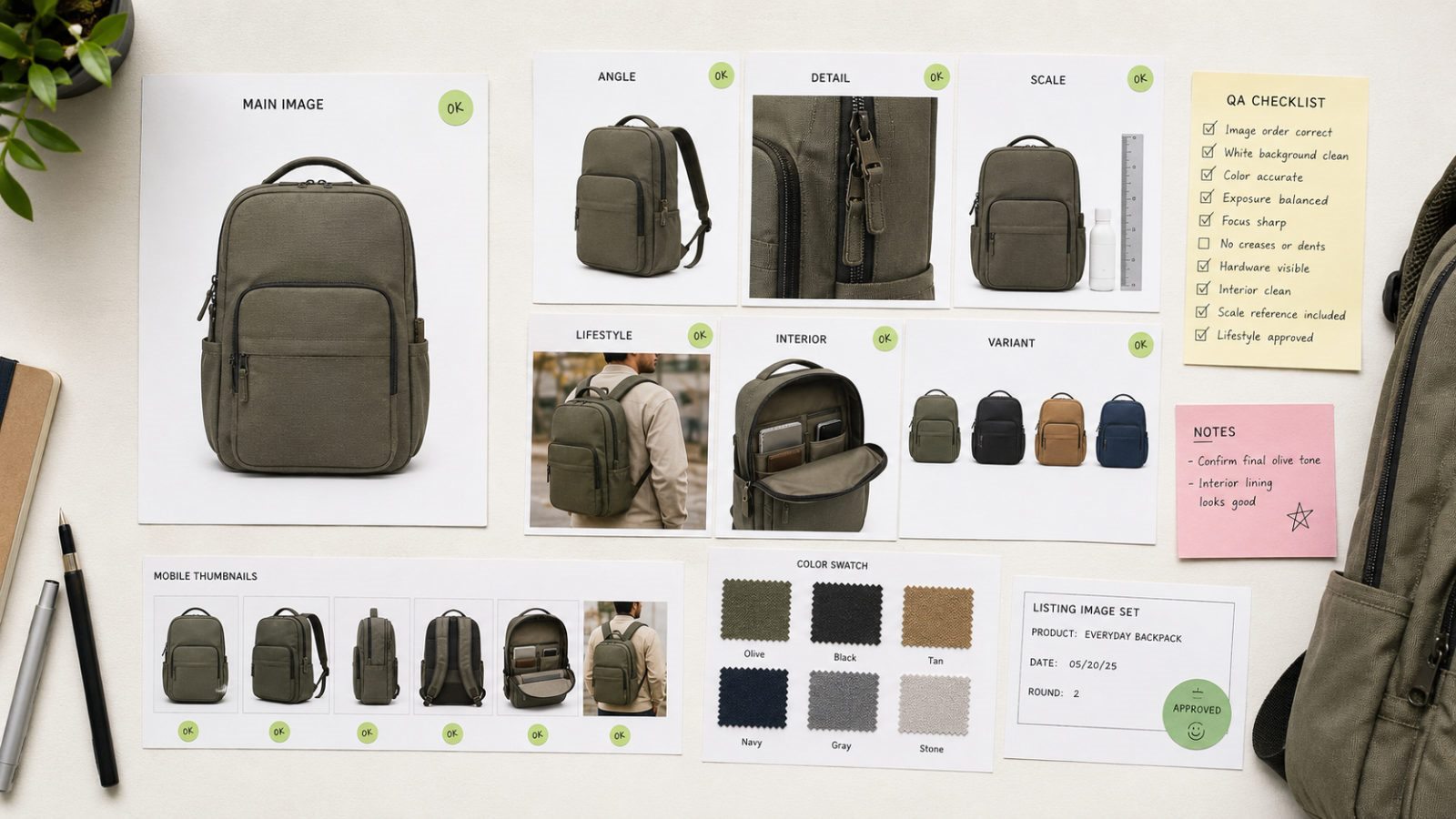
Build and review the image set
Many Amazon product listing images fail because the gallery repeats the same product view in slightly different crops. A front view, another front view, a lifestyle image that hides the product, and an infographic full of small text give the buyer little new information.
A stronger gallery starts with a question map. The main image answers, "Is this the exact item I was looking for?" The second image answers, "What does it look like from another angle?" A detail image answers, "Can I trust the material and finish?" A scale image answers, "Will this fit my body, room, shelf, bag, countertop, or device?" A use image answers, "Can I picture this in my life?" A comparison or variant image answers, "Which option should I choose?"
This is the core of Amazon listing image optimization. The gallery should remove buying friction one image at a time.
The 2026 Amazon listing image stack
The exact image order can change by category, but this structure works for many consumer products.
| Image slot | Best job | What to avoid |
|---|---|---|
| Main image | Identify the exact product clearly in search and on the detail page | lifestyle props, badges, extra accessories, heavy shadows, tiny product scale |
| Angle image | Show shape, depth, back, side, or hidden parts | repeating the same front view |
| Detail image | Prove material, texture, stitching, ports, labels, finish, closure, or control surface | macro shots so close the buyer loses context |
| Scale image | Show size against a body, hand, room object, shelf, device, or standard item | props that look included when they are not |
| Use image | Show the product in a realistic use environment | cinematic scenes where the product becomes secondary |
| Feature proof | Explain a specific feature with limited labels, arrows, or callouts | tiny text that disappears on mobile |
| Variant or bundle image | Compare color, size, pack count, included parts, or set options | mismatched colors, missing parts, or images shared across wrong SKUs |
| A+ bridge image | Continue the same visual language in A+ Content modules | a completely different style that makes the page feel stitched together |
The main image does the search job. The gallery does the buying job. A+ Content supports the brand and objection-handling job. Treating these as one visual system is usually more effective than producing each file separately.
Main image checks
The main image is the highest-risk slot because it carries compliance, search clarity, and first-click pressure at the same time. A strong main image usually has five traits.
First, the product fills enough of the frame to remain readable in search. Amazon Ads says product detail page images should fill at least 80% of the image area, and many seller-facing references discuss a higher product-fill expectation for main images. For day-to-day production, leave enough white space to show the whole item, but make the product large enough that a mobile shopper can recognize it quickly.
Second, the product should be photographed or rendered straight enough that the shape is easy to understand. Odd angles can look stylish, but they can also make the item look distorted, smaller, or less stable than it is.
Third, remove anything that can look like a claim or extra included item. If the box, case, strap, charger, plant, stand, or decorative accessory sits outside the purchase, keep the main image from implying that it ships with the product.
Fourth, protect color accuracy. Main images for beige, black, white, metallic, leather, glass, and fabric products often drift after background cleanup or AI enhancement. A better-looking file that changes the SKU is a bad listing image.
Fifth, check the thumbnail. Open the main image at mobile size and ask whether the product still reads before zoom. Amazon product listing image best practices 2026 should always include a thumbnail check because most buyers skim the small image before they inspect the full-resolution source file.
Secondary image checks
Secondary Amazon listing images can include use context, feature callouts, comparison layouts, and lifestyle scenes, but they should still earn their space. A gallery slot is valuable. Use it to answer a question that affects purchase confidence.
For a backpack, prove capacity, laptop fit, strap padding, side pocket, zipper quality, front pocket, body scale, and travel use. For a cosmetic bottle, prove texture, applicator, quantity, routine step, skin-safe claim support, variant color, and box contents. For a small electronics accessory, prove port fit, cable length, material, device compatibility, heat or durability context, and pack contents.
This is where category-specific Amazon custom product listing image best practices matter. A handbag, supplement jar, kitchen tool, pet product, and USB accessory need separate image stacks because the buyer's doubts change by category.
AI image generation boundaries
AI image generation is useful for secondary scenes, background tests, layout concepts, A+ visual drafts, and fast category exploration. It can also help teams produce more consistent listing images when they start from the same source product, use fixed prompts, review outputs as a set, and enhance the final selected images.
The risky parts are predictable. AI may change the product shape, add seams, remove seams, alter material, invent accessories, smooth texture too much, change logo placement, shift color, or create a lifestyle scene that suggests the product can do something it cannot do. These errors are small enough to pass a casual glance and serious enough to mislead a buyer.
For Amazon listing image AI workflows, split the work into two phases. Use AI to explore scene, angle, and layout. Use manual QA to approve SKU truth, category rules, and buyer-facing claims. The last review should compare the generated image against the real product, not against the prompt.
Pre-publish QA checklist
Use this checklist before uploading or refreshing Amazon product listing images.
- The main image shows the exact product for sale.
- The product remains recognizable at mobile thumbnail size.
- White background cleanup did not erase edges, straps, cords, handles, fur, glass, or transparent parts.
- The image is sharp after export and compression.
- Product color matches the variant selected.
- Props read as scale or context, with included parts labeled separately.
- All labels and callouts are readable on mobile.
- Any claim shown in an image is supported elsewhere on the listing.
- Lifestyle scenes avoid false scale, weather use, durability, compatibility, or safety claims.
- The gallery covers angle, detail, scale, use, variants, and included parts where relevant.
- A+ Content uses the same product facts, color palette, and claim discipline as the image gallery.
- AI-generated images have been checked against a real SKU reference.
This checklist is simple, but it catches the problems sellers keep raising in marketplace communities: rejected main images, blurry A+ exports, product-fill uncertainty, and AI edits that look attractive but change the product.
Category examples
Amazon listing image optimization becomes easier when the category decides the proof.
| Category | Image proof that matters most |
|---|---|
| Bags and accessories | capacity, scale, strap, zipper, pocket, material, color variant, body fit |
| Beauty and skincare | bottle size, texture, routine step, applicator, pack count, shade variant, ingredient context |
| Small electronics accessories | port fit, cable length, compatibility, material, heat context, included parts |
| Home goods | room scale, material texture, dimensions, assembly, storage, surface finish |
| Apparel | fit, fabric drape, size chart, model scale, color accuracy, detail stitching |
| Pet products | animal scale, material, cleaning, safety, durability, size variant |
A generic image template misses too many category-specific questions. The gallery, product page, and production workflow should reflect the questions buyers ask in that category.
LoomaDesign workflow for Amazon listing image QA
LoomaDesign is useful after the SKU facts are approved and the team needs a repeatable production flow. Use Product Retouching to prepare the source, the Additional Image Generator for secondary visuals, and Amazon A+ Content Image when the gallery needs a coordinated A+ handoff. The full sequence is documented in the Amazon listing image and A+ workflow.
The safest workflow is practical. Start with the real product source photo. Generate or edit secondary scenes around specific buyer questions. Keep the main image conservative and compliant. Review every output against SKU truth. Then use an image enhancer when the selected image needs sharper detail, cleaner edges, or a stronger export.
For related workflows, see the Amazon listing image size guide, the Amazon listing optimization visual QA guide, and the product image enhancer.
FAQ
What is the best Amazon product listing image practice for 2026?
Use each image slot to answer one buyer question. The main image should identify the exact product clearly, while secondary images should prove size, material, use, details, variants, and included parts.
How many Amazon listing images should a seller use?
Use enough images to answer the buying questions for the category. Amazon Ads recommends four or more high-quality images for advertised product detail pages. Many sellers plan six to nine gallery assets when the category has meaningful details, variants, or use cases.
Can AI images be used for Amazon product listings?
AI can help with secondary scenes, concepting, and image variations, but the final image must accurately represent the product. Check shape, material, color, included parts, scale, claims, and category rules before upload.
Should the main image be creative?
The main image should be clear first. Save most creative scene work for secondary images and A+ Content. A main image that looks interesting but confuses the product, includes non-included props, or fails background rules can hurt the listing.
What is the difference between Amazon listing image size and best practices?
Image size covers pixels, dimensions, file quality, and zoom readiness. Best practices cover the buyer-facing job of each image: main-image clarity, gallery order, detail proof, mobile readability, AI QA, and A+ consistency.
Sources and data points
- Amazon, "Product image optimization", current guidance on pure-white main images, 85% product coverage, file dimensions, and 1,600-pixel zoom recommendations.
- Amazon, "How to create product listings", guidance on product detail pages and uploading up to nine photos.
- Amazon Ads, "How to improve your product detail page for advertising", guidance on using multiple high-quality images to show angles, details, features, use, and variations.
- Amazon Sell, "A+ Content", guidance on enhanced images, customized text placements, videos, comparison charts, and AI-assisted A+ content generation.