LoomaDesign

On-Model Visual Workflow

AI Product Model Image Generator

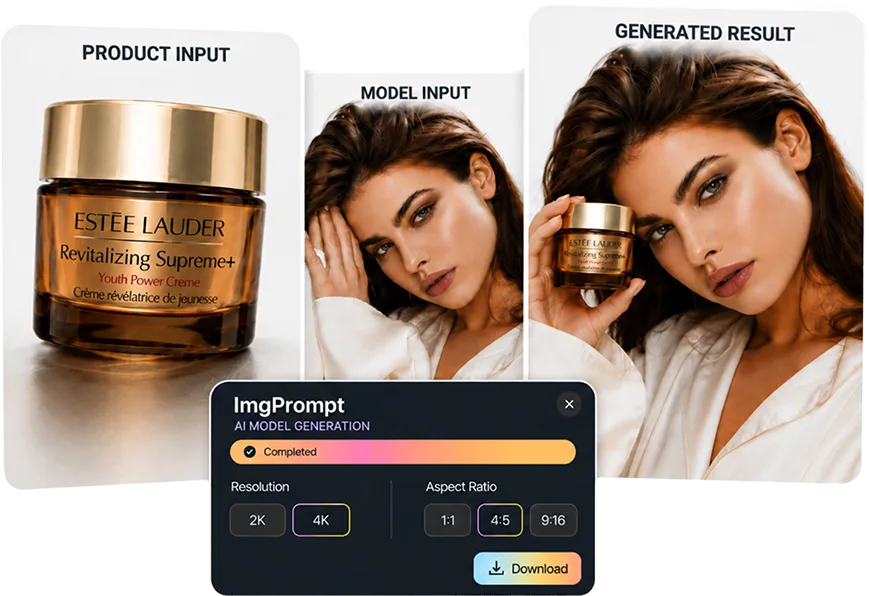
LoomaDesign helps ecommerce teams create model-led product visuals faster when a plain product shot is not enough to show fit, wear, or presentation.

AI Product Model Image Generator

快速说明

Use Product Model Image when buyers need to see the item on a person or in a model-led visual, especially for apparel, accessories, and product categories where scale and styling matter.

使用场景

这个功能最适合解决哪些电商图片问题

Create model-led visuals for apparel and fashion product listings.

Generate more product presentation variants without a new shoot.

Support ads and landing pages that need a human visual anchor.

工作流程

从商品输入到可用输出的清晰路径

Step 1

Upload the product image

Start with a clean product asset that clearly shows the item you want represented.

Step 2

Set the model direction

Choose the model or visual direction that fits the product, audience, and campaign.

Step 3

Generate the model image

Create an on-model visual that can support listings, ads, landing pages, or catalog tests.

为什么选择 Looma

用户进入工具前需要理解的重点

When model imagery is more useful than a packshot

Some product categories sell better when buyers can understand scale, fit, or human context.

  • Use model images when the product is worn, carried, styled, or judged by fit.
  • Use them when product-only images feel too abstract for the buying decision.
  • Use them to create more ad and landing-page variants from existing assets.

What the output should protect

A useful model image should improve presentation without losing product accuracy.

  • Keep product shape, color, material, and major details believable.
  • Avoid unrealistic hands, broken body structure, or awkward product placement.
  • Make the final image practical for ecommerce review and publishing.

Where it fits in the content system

Product Model Image sits between clean product inputs and richer listing content.

  • Use retouched product images as cleaner inputs.
  • Use model images in ads, galleries, and PDP supporting visuals.
  • Use stronger model visuals as material for A+ content and creative testing.

常见问题

用户开始使用前常问的问题

相关资源

继续查看 Looma 内容集群