Añadir contexto humano a moda, accesorios y productos de uso personal.

Producto mostrado con modelos
Generador de imágenes de producto con modelos
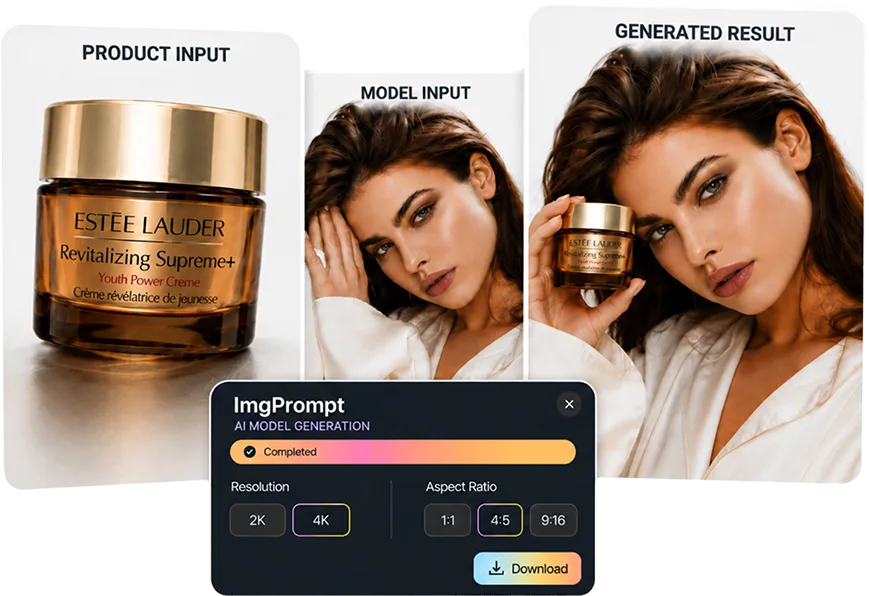
Coloca un producto en una escena natural con modelo, controla escala y composición, y comprueba que el SKU siga siendo reconocible. La página explica qué preparar, cómo trabajar y qué revisar antes de publicar.
Respuesta rápida
Generador de imágenes de producto con modelos sirve cuando el equipo necesita imágenes con modelo para fichas, anuncios y pruebas creativas. Prepara una referencia clara del producto y la dirección de persona, pose y contexto, revisa la forma, la escala, el color y la colocación real del producto y conserva solo las versiones aptas para ecommerce.
Casos de uso
Dónde ayuda más rápido a equipos ecommerce
Probar perfiles de modelo y encuadres antes de organizar una sesión.
Crear recursos coherentes para ficha, anuncios y redes sociales.
Flujo de trabajo
Un camino claro desde el input hasta una imagen usable
Paso 1
Prepara una referencia fiable
Reúne una referencia clara del producto y la dirección de persona, pose y contexto. Una fuente clara reduce correcciones posteriores.
Paso 2
Define la tarea visual
En LoomaDesign, el trabajo consiste en definir el modelo y revisar contacto, escala, perspectiva e iluminación.
Paso 3
Compara y exporta
Revisa la forma, la escala, el color y la colocación real del producto y conserva las versiones que formen imágenes con modelo para fichas, anuncios y pruebas creativas.
Por qué Looma
Lo que conviene entender antes de probar la herramienta
Cuándo usar las imágenes de producto con modelos
La herramienta aporta valor cuando cada imagen responde a una necesidad de producción concreta.
- Añadir contexto humano a moda, accesorios y productos de uso personal.
- Probar perfiles de modelo y encuadres antes de organizar una sesión.
- Crear recursos coherentes para ficha, anuncios y redes sociales.
Detalles que deben sobrevivir a la generación
La revisión compara la referencia y la salida antes de aprobar una pieza para el catálogo.
- Comprueba la forma, la escala, el color y la colocación real del producto.
- Rechaza accesorios no incluidos y funciones que la documentación del producto no respalda.
- Revisa la imagen como miniatura móvil y también a tamaño ampliado.
Cómo integrarlo en el flujo ecommerce
Asigna cada versión aprobada a una ficha, anuncio o tarea de diseño. No publiques todas las variantes generadas.
- Entrega imágenes con modelo para fichas, anuncios y pruebas creativas al responsable de ficha o campaña.
- Registra por qué se rechazó una versión para ajustar la siguiente generación.
- Conserva la foto original como referencia de SKU para futuras iteraciones.
FAQ
Preguntas frecuentes antes de empezar
Recursos relacionados
Continúa con el contenido de Looma
Función relacionadaSolución
Generador de modelos de moda con IA
Genera imágenes de prendas sobre modelos para catálogo y anuncios. Controla persona, ajuste, pose y contexto sin perder el diseño real.
Abrir recurso
Función relacionadaSolución
Probador virtual para ecommerce
Crea pruebas virtuales de ropa, calzado, joyería, pelucas y gafas de sol desde un mismo flujo con controles propios para cada categoría.
Abrir recurso
Función relacionadaSolución
Retoque de fotos de producto con IA
Limpia fondo, polvo, dominantes de color y sombras de una foto de producto. Conserva forma y material para obtener una fuente fiable.
Abrir recurso